• We do not provide troubleshooting help for unsupported phones. Please try with a supported phone.
  • V20 Update 10 Alpha 2 Learn more

Can't compose full number for Certain External Calls

Status
Not open for further replies.

gregory.b

Silver Partner
Joined
Sep 28, 2020
Messages
101
Reaction score
6
Dear all,

My current issues is that a User from his IP phone Yealink T58 is trying to dial a number for external Calls. They actually use the Prefix 9 to do external Calls this has been configured and was working fine.
Now out of nowhere the User is unable to Finish the number composed. Lets say the number is 912345678 but however he is able to dial until 912345 then it doesn't let it finish.
The Outbound Rules were already configured to allow this prefix. SO I don't understand what is the issue.

In the Activity Log is said : " Target end point cannot be built "
Can someone please has any ideas why this is happening and revert back as soon as possible.
Treat as Urgent please.
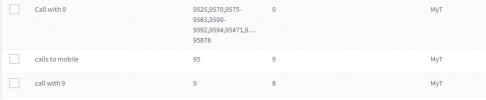

outbound rule issue.PNG

The outbound rule is as followed base on Mauritius prefix.

Regards,
Gregory.
 
Hi Gregory,

Are you saying that the physical phone keypad stops accepting key-presses after reaching 912345 ?

To compare, can you dial the entire number using a 3CX client instead?
 
Hi Gregory,

Are you saying that the physical phone keypad stops accepting key-presses after reaching 912345 ?

To compare, can you dial the entire number using a 3CX client instead?
Yes on the physical phone it stopped after 912345,
Also yes on the 3CX client it seems to be working fine.

The user j=have to User there Mobile phone to be able to make the calls. Which is really weird.
 
Please tell me the following to see if I can replicate this

  1. Are you using custom templates for the T58 or the default ones we provide?
  2. Firmware version of the T58
  3. Your PBX Version
  4. A sample number that I can also dial which would cause this problem
 
Please tell me the following to see if I can replicate this

  1. Are you using custom templates for the T58 or the default ones we provide?
  2. Firmware version of the T58
  3. Your PBX Version
  4. A sample number that I can also dial which would cause this problem
okay so we use the provided template of 3CX for the T58
The firmware of the T58 is : 58.86.0.20
We are at the last version of the 3CX version 18 WE even update to the new Version 18 beta that was just release.
A sample number that you can dial is 957057281 ( I don't if it will cause the same issues tho, because the client is using there phonebook and i can't provide that.)
 
Hi Gregory,

I tried this on a T58 using the same firmware but in my case I can fully dial 957057281.

Just to be on the safe side, why don't you try a factory reset on the Yealink, and then reprovision it?

Let's see if the problem goes away once we do that, just to eliminate the possibility that something in the Yealink is not default and may be causing this behavior
 
Hi Gregory,

I tried this on a T58 using the same firmware but in my case I can fully dial 957057281.

Just to be on the safe side, why don't you try a factory reset on the Yealink, and then reprovision it?

Let's see if the problem goes away once we do that, just to eliminate the possibility that something in the Yealink is not default and may be causing this behavior
Hi John,

Good to hear that unfortunately i'm operating remotely and not on site. I will try to reboot the phone instead of factory reset because the diverse Security and Vlan on the phone where i can't operate remotely and the User has no technical knowledge to help. Once it's done After Office hours I will revert Back for an update on the situation.

Despite that you don't have any idea why this is occuring ?
 
Another issues is that ,

Is there any thing that can block the phone from downloading it's firmware. No that that at this client site the network is close and they have a VLAN and the Phone are tagged on the Switch.

As since some time now the phone that were already installed I'm unable to update there firmware Version and I know this can become an issues later cause the phone need this firmware.
 
Sure no problem, reboot it and see how it goes.

As for the firmware you would have to do some analysis because there are many reasons it can fail

Some examples:

- Phone can download firmware, but the current version is too old and it refuses to accept latest. You must manually install the in-between versions first.

- Phone can download firmware, but if you upgrade too many devices at the same time you may be stressing the internet connection there, and all the phones end up with an incomplete download

- Phone might be on a network/subnet/VLAN that does not allow internet traffic or HTTP/HTTPS, only Voice traffic. The phone needs internet HTTPS access to install firmware if the PBX is remote. It also needs HTTP access if using a local PBX on the same LAN.

You will have to investigate these possibilities, don't make any assumptions yet based on setup. You might think there is access but if you run a capture on the phone's LAN port you could discover otherwise..
 
Sure no problem, reboot it and see how it goes.

As for the firmware you would have to do some analysis because there are many reasons it can fail

Some examples:

- Phone can download firmware, but the current version is too old and it refuses to accept latest. You must manually install the in-between versions first.

- Phone can download firmware, but if you upgrade too many devices at the same time you may be stressing the internet connection there, and all the phones end up with an incomplete download

- Phone might be on a network/subnet/VLAN that does not allow internet traffic or HTTP/HTTPS, only Voice traffic. The phone needs internet HTTPS access to install firmware if the PBX is remote. It also needs HTTP access if using a local PBX on the same LAN.

You will have to investigate these possibilities, don't make any assumptions yet based on setup. You might think there is access but if you run a capture on the phone's LAN port you could discover otherwise..
Thank you so much,

But since am able to connect to the management console remotely, I can assume that despite the VLAN on site that the network is providing internet and not only voice or am I wrong ?

I think you are right it might have only voice i will ask my partner that did the Network infrastructure there.
 
Can you please provide a link or give me the necessary requirement that is needed for a phone to download firmware on 3CX I will ask them to check if those are enable

I need the Full requirement for the firmware update on a network with VLAN
 
The word "assume" got me in trouble many times in the past, learn from my mistake and avoid assumptions ;)

I cannot give you a list of requirements to be honest, this is just basic HTTP and TLS connections which is standard stuff. To assist you, I can provide the following hint:

1. Start capture on the phone (or mirror capture its LAN port)

2. Send the upgrade command from 3CX

3. You will see a SIP NOTIFY reaching the phone and the contents will reveal the URL for the upgrade

4. Monitor the phone traffic after the NOTIFY, and you should be able to follow the trail from there and you will see the the sequence of events that happens

The rest is up to you! :)
 
The word "assume" got me in trouble many times in the past, learn from my mistake and avoid assumptions ;)

I cannot give you a list of requirements to be honest, this is just basic HTTP and TLS connections which is standard stuff. To assist you, I can provide the following hint:

1. Start capture on the phone (or mirror capture its LAN port)

2. Send the upgrade command from 3CX

3. You will see a SIP NOTIFY reaching the phone and the contents will reveal the URL for the upgrade

4. Monitor the phone traffic after the NOTIFY, and you should be able to follow the trail from there and you will see the the sequence of events that happens

The rest is up to you! :)
Okay for sure it noted no more assumptions ;)

Okay thank you very much I will keep and update once I check up everything.
Thank you for the patient and advice.
 
  • Like
Reactions: JohnS_3CX
Status
Not open for further replies.

Forum statistics

Threads
112,149
Messages
590,965
Members
165,170
Latest member
SupportRock