Can't delete personal M365 contacts

BryanK

Silver Partner
Basic Certified
Joined
Sep 8, 2022
Messages
4
Reaction score
4
I have a new V20 deployment. I synced the users from M365 and initially had it sync the contacts for each user. The client then decided that they DON'T want the contacts synced so I disabled that tick mark on each user. The contacts remain the system and when you edit they are missing the pencil and the trash in the upper right corner so you can't delete them. I also tried the mass delete tool (Admin -> System - Phonebook -> Bulk Delete Contacts -> Microsoft 365 Contacts) but that did nothing because it looks like that is only meant to delete shared mailbox contacts which would show up in the Company phonebook.

Anyone have any ideas?

Manually-added contact:
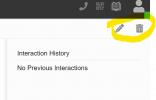
Screenshot 2024-04-22 221403.png

M365 synced contact:
Screenshot.JPG

User settings clearly showing that the contact sync is disabled:
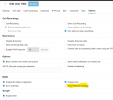
Screenshot 2024-04-22 221940.png
 
Are you accessing as a System Owner?
 
  • Like
Reactions: Evolute IT
You do get the option to delete correct?
 
You do get the option to delete correct?
No. I showed the screenshots in my original post. The delete button (trash can) is there for contacts that I manually add to 3CX but it is NOT there for contacts that were synced from M365, even after I disabled M365 sync for that user.
 
You can either leave the sync option ON and delete the unwanted contacts from M365 Side OR re-create the user with the Sync Personal Contacts option off

More clarification on current functionality of M365 Personal contacts sync
- M365 Personal Contacts cannot be deleted from the 3CX Side
- "Sync personal contacts" in user options will stop any new contacts from being synchronized but existing contacts will remain as is
 
You realize this is a busted setup, right? Why should I need to DELETE THE USER in order to remove their contact list?
 
Has this issue every been resolved?
 
I've ran into the exact same issue with my client. It's a bit embarrassing having to tell my customer that they are not able to delete the synced contact. I'm hoping that this would be addressed in a later release.
 
  • Like
Reactions: Gasha
This issue presents a potentially serious security risk on so many levels. This has caused me embarrassment with my clients as well. M365 integration was one of features that made 3CX an attractive option, but this implementation makes one pause to reconsider other options.
 
  • Like
Reactions: telecoms1 and Gasha
Ran into this issue, as well.
Looking for a way to delete M365 contacts that were inadvertently synced. The bulk delete under Admin->System->Phonebook deleted some of them, but I still see a bunch of entries in my Personal contacts that seem to be tied to M365. These show under M365 Contacts in the Windows 3CX app, and under Personal contacts in the 3CX web interface.
Deleting them fails, making the system look quite buggy.
I need a fix before I can proceed with the rollout to our users.
 
When will this be solved?
 
I also tried clearing the cache and restarting the apps to make sure old data wasn't interfering with the process. But that didn't solve the problem.
 
Any update? User cannot delete M365 contacts. Sync is disabled. Delete and remake the user is not an option. 250 users
 
Also voting for this to be fixed in a future release. Very inconvenient.
 
Thank you for your feedback. This will be addressed in Update 4 in the following way.

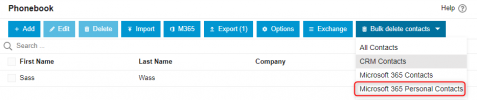
Users will be able to delete M365 Personal Contacts via the Phonebook Settings, as shown in the attached screenshot. If M365 "Sync Personal Contacts" option is disabled, the contacts will not reappear.

M365-Pers.png
 
  • Like
Reactions: Evolute IT