Solved Can't login to management console - server down

Status
Not open for further replies.

Mhojo_NZ

Customer
Joined
Feb 28, 2019
Messages
15
Reaction score
2
Today raft of issues with our 3CX install. On premise installation running on Windows Server 2019 Standard. Upgraded to V18 end of Dec. Installation has fully routed setup with 2 network connections - 1 to LAN and 1 to SIP Provider on private network. No recent changes to network topography and everything was OK yesterday.

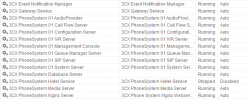
Can't login to management console - error appears that 'server down'. Also softphone clients not working. All 3CX services appear to be running. Restart of 3cx and the server and firewall has not resolved the issue. No errors visible in log files.

Should there be a management service running or is V18 different?
 

Attachments
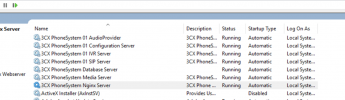
  • 1643331579558.png
    1643331579558.png
    239.4 KB · Views: 54
Last edited by a moderator:
Click on startup type, which will sort sevices .Check all services with automatic start, and see if any have not started - try to start any that have not started
 
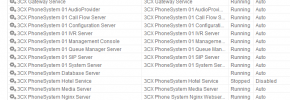
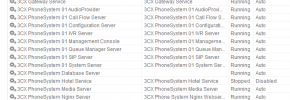
The system is missing some services

1643357439545.png


Not sure how you would get them back,
 

Attachments

  • 1643357372623.png
    1643357372623.png
    30.5 KB · Views: 9
  • 1643357400347.png
    1643357400347.png
    30.5 KB · Views: 9
Last edited:
3CX services are all running and set to automatic startup.
 
3CX services are all running and set to automatic startup.

As per my screenshot you are missing some 3CX services, this is the reason you are unable to access the management console.
 
Thought something looked off. I Can reinstall from backup. How can you suddenly loose services?
Could be a failed update or AV
 
We have seen it, where AV affects 3CX

You need to exclude the following folders with your AV

  • C:\Program Files\3CX Phone System\*
  • C:\ProgramData\3CX\*


If you have a backup which includes the FQDN and license key, copy this file locally (outside of 3cx folders)

1. Uninstall 3CX from the server
2. Reboot the server
3. Install 3CX.
4. Run the 3cx configuration tool - when asked select restore from backup - select the backup file
 
Have you managed to re-install using the backup?

Any chance you identified what caused this too?
 
Fully restored from backup but still no idea what caused this.
 
Hi @Mhojo_NZ,

Glad to hear this is now resolved. If it happens again, please do open a new thread to investigate further.
 
Status
Not open for further replies.

Forum statistics

Threads
111,974
Messages
590,081
Members
164,899
Latest member
mazet