• We do not provide troubleshooting help for unsupported phones. Please try with a supported phone.
  • V20 Update 10 Alpha Learn more

Can't provision Granstream GXP2170 - account not registered

IA Alan

Bronze Partner
Joined
Oct 11, 2024
Messages
7
Reaction score
0
Hi All

We have a Granstream GXP2170 that shows as account not registered when trying to provision the phone.

I've tried to manually copy the settings form another phone but that didn't work. I've also tried to reprovision. I've deleted the phone from the 3cx system entirely and added back, added to the user. It connects, the phone gets the 3CX logo on it but when you lift the handset it says account not registered.

I believe it's on 1.0.11.74 firmware.

Any ideas?


I've also just noticed this message in the log


RPS request for GrandStream (MAC:############) IP Phone of #USER# NOT delivered. You will need to configure the phone manually by copying and pasting the provisioning link https://####domain####.3cx.co.uk/provisioning/ji7dbwo1w4x4s/ in the phone web interface. Error Message: Error Owned_by_other_user
 
Last edited:
Error Message: Error Owned_by_other_user
This MAC has been added by some other entity outside of 3CX.

You will have to contact Grandstream to have it removed before you can use this to provision in 3CX.

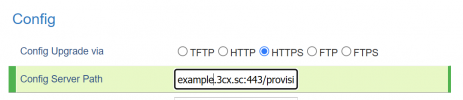
Meanwhile, you can either use PnP or paste the link in the phone manually.
 
This MAC has been added by some other entity outside of 3CX.

You will have to contact Grandstream to have it removed before you can use this to provision in 3CX.

Meanwhile, you can either use PnP or paste the link in the phone manually.
Where do you paste the link in the phone?
 
Maintenance > Upgrade and Provisioning:
1728895181436.png

Then Save and Apply, gonna need a reboot after that.
 
Just tried that and I still get Sip Registration NO under account status page of the phone. The phone seems to get some of the settings as the password changes to be the one in 3CX and the 3CX logo appears on the phones screen but still the same "account not registered" when lifting the handset.
 
If your phone is not on the same LAN as 3CX (ie. effectively it's a remote phone) you need to have an SBC.

In this case, it would appear to provision, but it would not be able to register since there is no path to reach the PBX without an SBC.
https://www.3cx.com/docs/3cx-tunnel-session-border-controller/

Please keep in mind that in V20:

- Remote STUN phones are not supported

- Remote phones must have an SBC on premises to connect via

- Some select models (Fanvil/Yealink/Snom) can have a built in SBC, which other devices can also share

- Local phones work fine (if you are not cloud hosted), but you must have Split DNS resolving your FQDN to your PBX local IP so the phones can reach the PBX
 
There is an SBC on the system. Does this change how we configure the phone or should it just pick up that it's available?
 
If you add it manually, it should automatically configure itself upon resetting it.

If you have not yet added it, you can do it fully automatic via the Phones > PNP page.

This requires that the phone has not yet been added though, and that it has already been factory reset and in idle mode.
 
So if I factory reset it, delete it from everywhere in 3CX and then go on the phones web interface and put in the provisioning link would that do it or is there something more to do?
 
Two methods:

A. Delete the phone from everywhere, and factory reset it. When it comes back (since you have a nice SBC running), go to Phones Page under PNP, then select your phone and assign it to an extension. It should configure itself automatically within a couple of minutes tops.

B. Delete the phone from everywhere, and factory reset it. You now have to add it again under your extension, with the correct MAC and model defined, and the correct SBC selected. Once this is done you may paste the link, save, and reboot.
 

Members Online Now

Forum statistics

Threads
111,831
Messages
589,277
Members
164,660
Latest member
RJenkinsROCK