Solved Can't Reformat Incoming Caller

Status
Not open for further replies.

dk812

Customer
Joined
Jan 24, 2022
Messages
9
Reaction score
1
Hello. I'm using inboud rules to reformat the incoming number. The problem that I can't reformat incoming numbers (incoming caller) the rule doesn't take effect.
It alway shows three fields From number:Name:To Number
I disabled the option "Add Group, Queue or DID/DDI Names to Caller ID" but it didn't help.
Then it always shows the following info: 93456789:Name of person who calling and the next row is the same number 93456789

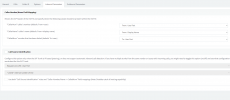
I have the following settings in the sip trunk inbound parameters.
1643219742114.png

I want to format as 0793456789 and that's it. I don't want to display any other info in the caller id.
Is it possible to do somehow?
 
I would ask your provider what number is being passed to the 3xc system.

Check activity log, to see what number is being passed.

Very unusual for the first two digits to be missing - does this number will all numbers

Make sure you have not setup https://www.3cx.com/docs/cid-reformatting/ , if so remove any settings - what is the number displayed now

What sip provider are you using ?
 
Hello, I'm sorry, my mistake the number is 9345678900. I saw in activity log, it says:
9345678900. And the format I need is 079345678900
Now i have no any settings here https://www.3cx.com/docs/cid-reformatting/
Our sip provider is local. It's in our business center. And experts from provider say that they give us the correct caller id and that we need to change it on our side. But I don't know how to do it. Any attempts lead to nothing. The numbers are simply added to the already existing caller id, i.e. the original caller id does not change.
These are logs from acction logs:

01/27/2022 1:08:57 AM - [CM503003]: Call(C:188): Call to <sip:+147;ext=[email protected]:0> has failed; Cause: 487 Request Terminated/INVITE from 52.114.76.76:5061
01/27/2022 1:08:57 AM - [CM503003]: Call(C:188): Call to <sip:[email protected]:0> has failed; Cause: 487 Request Terminated/INVITE from 127.0.0.1:5483
01/27/2022 1:08:57 AM - [CM503003]: Call(C:188): Call to <sip:[email protected]:0> has failed; Cause: 302 Moved Temporarily/INVITE from 192.168.100.147:5060
01/27/2022 1:08:57 AM - Call to T:Extn:147@[Dev:sip:[email protected]:5483;rinstance=4779da8d2090fed2,Dev:sip:[email protected]:5060,Dev:sip:+147;ext=[email protected]] from L:188.1[Line:10001<<9345678900] failed, cause: Cause: 302 Moved Temporarily/INVITE from 192.168.100.147:5060

I have Teams direct calls connected.
When I'm calling on sip phone it's ringing and the format now is "From number:Name:From Number and I can't change it using cid formatting. It doesn't change anything
 
Last edited:
Hello @dk812

The PBX will present whatever is sent from the provider and whatever is configured in the inbound parameters of your trunk.

In your case you have it reading the Callers name from the "From:Display Name" header and the callers number from the "From:User Part". So I am guessing that the provider is sending the callers name and number to the From:Display Name" header and the number again in the "From:User Part".

So what you need to do is to tell the PBX to not read the "From:Display Name" header. To do so just set the value to a header that does not exist. Try the following setting and see if that leaves only the number displayed.

1643272220581.png


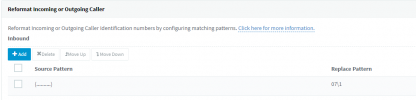
The reformat the number using the guidelines from this guide: https://www.3cx.com/docs/cid-reformatting/
You could try the following assuming that all incoming numbers are 10 digits long.
1643272725902.png
 
Hello @YiannisH_3CX
Thank you. It did help.
I have also the following question.
When Teams is receiving call it has caller id as I set in cid formatting:
079345678900
but when I call back it added +7 code and it looks like +7079345678900
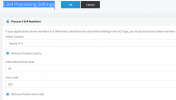
In my 3CX setting in E164 Processing Settings i have
1643277447301.png
so everything is working but
is it possible to change teams to dispaly number in journal of outgoing calls in the correct format?
Maybe I need to change something in the dial plan for teams?
1643277676062.png
 
Glad I could help.

Regarding the dialing issue for Teams, I would download the dial plan for another country (UK for example) and for the Other dial plan to compare those and understand the logic behind it. Then save your current settings and make any necessary changes. Generally I would advice against this but its up to you.
 
  • Like
Reactions: dk812
Glad I could help.

Regarding the dialing issue for Teams, I would download the dial plan for another country (UK for example) and for the Other dial plan to compare those and understand the logic behind it. Then save your current settings and make any necessary changes. Generally I would advice against this but its up to you.
Thank you. Just created and changed some of the rules in Teams and some settings in 3CX.
Changed dialed plan rule 3CX Internal to ^(\d+)$ $1 so it won't add +7 code automatically to all numbers i dial through teams dialpad. Afterthat i enabled e164 processin, unchecked removed country code, add prefix 0.
And for inbond teams calls I wanted to reformat numbers 078126543221 to +78126543221 so i did:
1) New-CsTeamsTranslationRule -Identity 'Add+' -Pattern '(^(0)([1-9]\d*))$' -Translation '+$3'
2) Set-CsOnlinePSTNGateway -Identity FQDN -InboundPstnNumberTranslationRules "Add+"
3) Set-CsOnlinePSTNGateway -Identity FQDN -InboundTeamsNumberTranslationRules "Add+"
 
  • Like
Reactions: YiannisH_3CX
Status
Not open for further replies.

Forum statistics

Threads
112,325
Messages
591,898
Members
165,479
Latest member
Senergia