Can't select trunk in reports in Update V6

PAS01

Bronze Partner
Joined
Jan 17, 2022
Messages
5
Reaction score
0
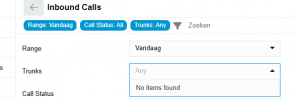
Customer can't select a trunk for all reports, this field gives No items found. The customer have owner rights.
1754037593297.png
 
Is this a Multi-Company setup?
 
No, it's not.
 
When I use our Systems owner rights I can select all the trunks. It's seems that the owner account does not have the needed previliges
 
Customer can't select a trunk for all reports, this field gives No items found. The customer have owner rights.
View attachment 48849
When a user is assigned the Owner role for a Department, and the trunks are configured as system-wide, those trunks will not be visible or manageable by the department owner. System-wide trunks are accessible only to system administrators and system owners, not to department-level users.
 
So I have to configure the direct number to a call queue instead of the system wide trunk?
 
If Trunks are used one per department, you can assign the Trunk, not just a DID, in the Trunk options to belong to that department, otherwise by default it is set as System Wide.
System Wide Trunk's statistics are viewable by the System Owner.
Department Trunk's statistics can be seen by Department OWner.
 
  • Like
Reactions: GregG_3CX

Forum statistics

Threads
111,957
Messages
589,929
Members
164,861
Latest member
LewisJC