Cant update firmware on Yealink T21 E2 via SBC

Status
Not open for further replies.

greychain

Gold Partner
Advanced Certified
Joined
Jul 13, 2018
Messages
779
Reaction score
122
I have two Yealink phones connected to my PBX via V18 SBC.

After disabling the trusted certificates setting on the phones both will now connect and register to the PBX.

The T19 E2 needed a firmware update, clicked on update and it's all updated.

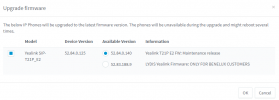
The T21 E2 also need an update, click on update - get the notification , click on OK and get notified it's being sent but nothing happens on the phone.

1635328290731.png
 
After disabling the trusted certificates setting on the phones both will now connect and register to the PBX.
The question here is, why was this required in the first place, are you perhaps using a custom FQDN?

If not, and are using a 3CX FQDN could you please the Updates section of the Management Console to see if there is a Hotfix available to install?
 
In response to this issue. https://www.3cx.com/community/threa...-sbc-and-arent-seen-on-pbx.85281/#post-400611

Yes we are using a custom FQDN, why would the T19 work but not the T21?

Looks like it may have updated finally. Although I didn't see the expected activity on the phone when an update is being done. Just needed to disable trusted certificates again after the update.

Nope it's not provisioning now but is visible on server
 
Last edited:
Since you're using a custom FQDN you would have to make sure that the device trusts the certificates. For yealink, you could check the following list for information on what certificates their devices trust so that you can compare it with your own certificate used for the FQDN: https://support.yealink.com/en/portal/knowledge/show?id=bab64fcca62fd012b682c533

Could you please also PM me the FQDN you're using?
 
The FQDN is a let's Encrypt issued FQDN
Tried hard reset followed by change the certificate setting to disabled again and now the T21 is provisioning.

Previously I had managed to do a firmware update to 140 but now the phone is saying it's back on 125.

Also after re-provisioning , the phone has enabled trusted certificates again. Also the trusted cert is re-enabled on the T19.

The only issue I have now is I cant do a firmware update on the T21 E2 again.
 
As per our PM conversation, this seems to be happening due to an expired root certificate in the certificate chain for your FQDN. I can confirm that the specific yealink device(T21P E2) will reject the connection because of it so what you're describing is expected to happened under these circumstances.
 
Got a couple of firmware updates from Yealink and they work.

Tried to upload but cannot as too big.

1636364326008.png
 
Glad to hear you managed to get them upgraded but, as mentioned via PM, manually upgrading the firmware will work in this case. What will fail is the communication between the IP Phones and the PBX over https due to the root certificate being expired meaning that future firmware upgrades and provisioning attempts for IP Phones will also fail if this is not sorted.
 
The new firmware auto-provisioned.

Well almost, I needed to click on assign extension again, which is a bit annoying but still better than not being able to provision. Back to yealink with this I guess.

Cutting and pasting the provisioning link into the phone directly does work.
 
Last edited:
The new firmware auto-provisioned
By that do you mean that you upgraded the firmware via the 3CX Management Console?

The screenshot in your previous reply shows a firmware version that is not a 3CX supported firmware version suggesting that this is not the case. That said, how exactly did you auto-provision the firmware?
 
Last edited:
Status
Not open for further replies.

Members Online Now

Forum statistics

Threads
111,832
Messages
589,283
Members
164,662
Latest member
DejanMDS