CDR : What is this IP address ? How to change

Status
Not open for further replies.

Helmut W.

Free User
Joined
Nov 29, 2021
Messages
31
Reaction score
4
Hello ,

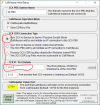
Trying to use CDR , but what is this IP address ? How to use ? How to change ?

1650449139817.png
 
That is where to send the dump. 127.0.0.1 is localhost. You will need to set up where it's going to receive the CDR.
 
There is no fixed IP address for that field unless you need Passive Server meaning the IP is that of the PBX. Selecting CDR service to work as a client means you will have the PBX connecting to a server so the IP in this case would be that of the server you manage. If you do not have such a server or a client to connect to 3CX I recommend using the "Single file for all calls" option which will create a log file that you can download from "Dashboard >> Activity Log >> Logs >> Instance >> CDRLogs".
 
There is no fixed IP address for that field. Selecting CDR service to work as a server or client means you will have something connecting to the PBX or the PBX connecting to something else. That something else would be a server or client you have and manage, hence, the IP. If you do not have such a server/client I recommend using the "Single file for all calls" option which will create a log file that you can download from "Dashboard >> Activity Log >> Logs >> Instance >> CDRLogs".
i'll try to use CallVitesse and put the 3cx server in Passive . So i have a IP¨from the client who runs the CallVitesse application , but where can i put the IP of this client ?
 
That would depend on a few things:

1. Where does the CallVitesse application expect to connect to. 3CX or a CallVitesse server?
2. If CallVitesse server, where is that, is it on a different machine or did you perhaps install this on the 3CX Host?
3. What will be connecting to 3CX and from where(IP)? Also, will it be connecting or will it be expecting a connection from 3CX?

If we're talking about just a client that will be connecting to 3CX then all you need to do is select the PBX's IP from that drop-down list and then set the port the PBX will be listening on for the connection from CallVitesse.

Note: Since you'll have an inbound connection coming in from an external source you will also have to configure your firewall to forward this traffic to the PBX.
 
Trying to use CDR , but what is this IP address ? How to use ? How to change ?
@Helmut W. - I think your question has been answered, but just to confirm:
With 3CX CDR in Passive Socket mode, the IP that was displayed in your screenshot is the local IP of the 3CX PBX (assuming you only have a single NIC) and the port (showing 3000 in your screenshot) is the port that 3CX is listening on for an incoming connection from whichever client you choose to use. If you are going to use CallVitesse then I'd recommend changing the port to 5015 since (assuming you are using a Debian install?) this port is left open and unused after the 3CX initial installation - otherwise you may have a firewall issue with the PBX that prevents connection.

You then configure CallVitesse to point at your 3CX machine - so the IP is the one shown in your 3CX screenshot and the port is 5015 (if you choose to use this). In 3CX Passive socket mode you don't need to use the IP address of the PC that CallVitesse is running on. Configure CallVitesse like this:
1650472793726.png
Once you have entered the IP/port for 3CX click the 'Validate' button - you will see if the connection is established as the fields will change to green.
 
And what happens to the data when your socket client goes down, or there is a blip in your network/internet between the client and 3CX? The answer is that data is lost and there is no way to retrieve it. A better, more resilient solution is to use CDR files, rather than a socket connection. I strongly discourage you from this approach.
 
  • Like
Reactions: Evolute IT
Hello ,

The PBX runs in the cloud , Callvitesse local on a server here at the office. So i can not establish a connection.
Maybe i use the CDR files from Voip tools suggestion.
 
If the Cloud enviroment is hosted by yourself you could just run it on an VM in the same network as the 3cx , thats how we set it up and works like a charm.
 
Hello ,

The PBX runs in the cloud , Callvitesse local on a server here at the office. So i can not establish a connection.
Maybe i use the CDR files from Voip tools suggestion.
Is running in the cloud a firewall issue? Often turning the connection around resolves these issues, so you could try using 3CX active socket mode and configure it to point at your CallVitesse WAN IP (possibly with port 5015 forwarding needed on your local end).
 
Status
Not open for further replies.

Forum statistics

Threads
111,974
Messages
590,083
Members
164,900
Latest member
Silent_Guru