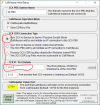
i'll try to use CallVitesse and put the 3cx server in Passive . So i have a IP¨from the client who runs the CallVitesse application , but where can i put the IP of this client ?There is no fixed IP address for that field. Selecting CDR service to work as a server or client means you will have something connecting to the PBX or the PBX connecting to something else. That something else would be a server or client you have and manage, hence, the IP. If you do not have such a server/client I recommend using the "Single file for all calls" option which will create a log file that you can download from "Dashboard >> Activity Log >> Logs >> Instance >> CDRLogs".
@Helmut W. - I think your question has been answered, but just to confirm:Trying to use CDR , but what is this IP address ? How to use ? How to change ?

Is running in the cloud a firewall issue? Often turning the connection around resolves these issues, so you could try using 3CX active socket mode and configure it to point at your CallVitesse WAN IP (possibly with port 5015 forwarding needed on your local end).Hello ,
The PBX runs in the cloud , Callvitesse local on a server here at the office. So i can not establish a connection.
Maybe i use the CDR files from Voip tools suggestion.
Founded in 2005, when VoIP was an emerging technology, 3CX has gone on to establish itself as a global leader in business communications.