Solved Certificate error Yealink?

Status
Not open for further replies.

Paultechnica

Platinum Partner
Advanced Certified
Joined
Feb 4, 2020
Messages
26
Reaction score
4
Hi all

Is anyone having troubles autoprovisioning yealink IP phones?
 
  • Like
Reactions: OlivierD and JTW
Hi all

Is anyone having troubles autoprovisioning yealink IP phones?
Hi

I've been battling with the issue of re-provisioning a T40G all day. The solution I have discovered in the last half hour is to log onto the web GUI of the phone, go to the Security tab, select Trusted Certificates and set 'Only Accept Trusted Certificates' to Disabled. Once the phone was provisioned, I had to do the same again, as it had enabled itself, in order for the 3CX Phonebook to be able to update.

By comparing this phone to a known working phone, it seems that a 'custom certificate' is not being loaded onto the phone during initial provisioning, which I guess is the 3CX PBX server certificate.

Hope this helps you move forward with your issue.

Would be nice to hear from 3CX Support on this one.

Kind regards
John
 
Yes, the old LE Root expired, and on firmware before 66.86.0.5 the phones will not provision or FW update.

Remove the LE ISRG Root X1 from the chain & the phones will come back. then you can provision, and firmware update.

See my comments here.
https://www.3cx.com/community/threads/sips-inbound-from-flowroute-stopped-working.84604/
Hi

Thanks for the link. I was hoping it might explain my issue as well with provisioning a Yealink phone today. I have entered my three certificates into the Certificate Decoder referred to. All mine are in date!

1. PBX FQDN 01-Nov-2021
2. R3 15-Sep-2025
3. ISRG Root X1 30-Sep-2024

Thanks.
 
Hi

Thanks for the link. I was hoping it might explain my issue as well with provisioning a Yealink phone today. I have entered my three certificates into the Certificate Decoder referred to. All mine are in date!

1. PBX FQDN 01-Nov-2021
2. R3 15-Sep-2025
3. ISRG Root X1 30-Sep-2024

Thanks.
Yes, remove the last, the ISRG Root & restart NGINX - then your phone3s should provision again.
 
I tried removing the ISRG root cert (from the security, Secure SIP screen) and rebooting our 3cx cloud instance, still no auto provision. If I log into a phone and tick ignore certificate the phone does provision.

This is using a T40G and Firmware V 76.84.0.95. Have 70 handsets to set up next week, so don't really want to have to fix each one manually..

Is there something I have missed?
 
I tried removing the ISRG root cert (from the security, Secure SIP screen) and rebooting our 3cx cloud instance, still no auto provision. If I log into a phone and tick ignore certificate the phone does provision.

This is using a T40G and Firmware V 76.84.0.95. Have 70 handsets to set up next week, so don't really want to have to fix each one manually..

Is there something I have missed?
You need to remove it from the Webserver ssl cert. not sure if you can access that on a 3CX cloud instance.
Would require ssh/console access to modify the file, then reload the nginx service to reload the Webserver
 
Removing that certificate is really really weird and i don't want to do that to be honest...
I think Yealink or 3CX needs to fix something or gives us a update.
 
We are having similar problems with multiple customers. Phonebook not updating, phones not provisioning and even hotdesking not working correctly..
 
Last edited:
We confirm. All customers with YealinkT19 E2 have problems. 3CX hot desking is not working since 01 October
 
I tried removing the ISRG root cert (from the security, Secure SIP screen) and rebooting our 3cx cloud instance, still no auto provision. If I log into a phone and tick ignore certificate the phone does provision.

This is using a T40G and Firmware V 76.84.0.95. Have 70 handsets to set up next week, so don't really want to have to fix each one manually..

Is there something I have missed?
The phone I have the issue with is a T40G. It was at firmware v 76.84.0.95 and I even tried downgrading the firmware to v 76.84.0.35 as well, without success.

The 'only' thing that springs to mind is that we have upgraded our PBX to v18 (from v16) since I was last able to provision a phone without issue.
 
@cmp1

I have changed the file /etc/ca-certificates.conf to not use the certificate mentioned above.
I executed the command 'update-ca-certificates --fresh' and i can see that it is using 1 certificate less.
Then i restarted ngnix services global and also in 3CX.
Still our phones with older firmware cannot provision. Am I doing it wrong or forgetting someting?
Best regards,
Randy
Technica
 
The phone I have the issue with is a T40G. It was at firmware v 76.84.0.95 and I even tried downgrading the firmware to v 76.84.0.35 as well, without success.

The 'only' thing that springs to mind is that we have upgraded our PBX to v18 (from v16) since I was last able to provision a phone without issue.
I do not think upgrading to V18 will fix this issue since we are also experiencing the issue on V18 instances.
 
The following is a suggested 'work around' and not a 'fix' for the issue.

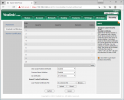
Log on to the web GUI for the phone. For a factory reset phone use the default log details, and for a provisioned phone use the 'phone web page password' which can be copied from the 3CX Phone System Management Console by going to the Phone Provisioning tab for the User of the phone and selecting the phone.

The following is for the T40G:
1633339681087.png

Note that I have 'Disabled' the 'Only Accept Trusted Certificates' value.

Note also that having provisioned the phone, the 'Only Accept Trusted Certificates' value reverted back to 'Enabled' which prevented the Phonebook from updating. I had to log back onto the phone and change the 'Only Accept Trusted Certificates' back to 'Disabled' to get the Phonebook to update.

This fix may also help with the hot desking issue.
 
Last edited:
I do not think upgrading to V18 will fix this issue since we are also experiencing the issue on V18 instances.
You misunderstood what I wrote. I am saying that the 'only' thing to have changed with our setup is that I have upgraded to V18 from V16 a few weeks ago, and so is it a V18 related issue. It would be interesting to know if anyone is experiencing this issue on a V16 PBX.
 
  • Like
Reactions: TechnicaICT
If you can login on the devices, then you can firmware update them to the latest version 66.86.0.15 - that will fix the problem without deleting anything.

Tried to delete ISRG Root X1 and rebooting NGIX, but that didn't fix anything.
 
You misunderstood what I wrote. I am saying that the 'only' thing to have changed with our setup is that I have upgraded to V18 from V16 a few weeks ago, and so is it a V18 related issue. It would be interesting to know if anyone is experiencing this issue on a V16 PBX.
Yes sorry I misread your post. We have customers on V16 expriencing this issue, zo its not only V18 related I'm afraid.
 
  • Like
Reactions: JTW
If you can login on the devices, then you can firmware update them to the latest version 66.86.0.15 - that will fix the problem without deleting anything.

Tried to delete ISRG Root X1 and rebooting NGIX, but that didn't fix anything.
Yes I understand that that would be a fix. But we have over 2000 phones installed at customer sites. We want to prevent to have to manually update every single 1 of them. Also we have normally use a custom firmware for our language which is always 1 version behind on Yealink international firmware.
 
Yes I understand that that would be a fix. But we have over 2000 phones installed at customer sites. We want to prevent to have to manually update every single 1 of them. Also we have normally use a custom firmware for our language which is always 1 version behind on Yealink international firmware.

Ye the solution is utter crap and not workable on big scale. The only other solution is waiting on 3CX/Yealink to fix the issue...
 
Last edited:
Hello,

Indeed there is an issue with the certificates for Yealink devices that use older firmware. We are working to see if there is an easy solution for these devices and we will let you know once we have something.
 
Status
Not open for further replies.

Forum statistics

Threads
112,025
Messages
590,368
Members
164,978
Latest member
FringeIT-Eric