
- Joined
- Feb 4, 2020
- Messages
- 26
- Reaction score
- 4


This worked for us, just tested with one customer.You need to remove it from the Webserver ssl cert. not sure if you can access that on a 3CX cloud instance.
Would require ssh/console access to modify the file, then reload the nginx service to reload the Webserver

Hi Olivier,This worked for us, just tested with one customer.
Glad it works for you. But I tried that and it doesn't resolve it for me. What version 3CX are you using?We removed the LE ISRG Root X1 cert in both the instance and the GUI under Security Settings -> Secure SIP and restarted the Nginx service.
Did you remove it in the instance aswell? We had to go into the Linux and remove it there. We have customers on both V16 and V18, we tested it on V16 but i don't think it's version related.Glad it works for you. But I tried that and it doesn't resolve it for me. What version 3CX are you using?
I think so. I deleted the certificate located in /usr/share/ca-certificates/mozilla and issued the command update-ca-certificates --fresh. Afterwards I restarted the ngnix service in 3CX.Did you remove it in the instance aswell? We had to go into the Linux and remove it there. We have customers on both V16 and V18, we tested it on V16 but i don't think it's version related.


we are using 53.84.0.140 with Yealink T19 E2 (latest) and 3CX doesn't workYealink devices that use older firmware

Yes that is correct as the T46s have newer certificates in their firmware which solve this issue. We are working on solution for older devices that do not have a firmware update that solves this issueJust as a point of interest, we have a mixture of T40G and T46S phones. I have tested a number of each and it would seem that the T40G phones fail when attempting to update the phonebook (unless I have manually disabled 'Only Accept Trusted Certificates', whereas the T46S phones are updating the phonebook without error.

I think so. I deleted the certificate located in /usr/share/ca-certificates/mozilla and issued the command update-ca-certificates --fresh. Afterwards I restarted the ngnix service in 3CX.
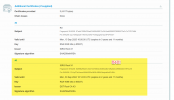
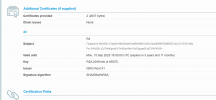

 ).
).OuffWe are having this exact same issue with Yealink T29G's on firmware version 46.83.0.130 which is the latest available.
This worked, thanks for the workaround and the exampleModify your CRT file.
/var/lib/3cxpbx/Bin/nginx/conf/Instance1/<3cxdomain>-crt.pem
Delete the 3rd certificate section. Then reload NGINX. Then run an ssl checker, and see how many certs its returning.
https://www.ssllabs.com/ssltest/analyze.html?d=3cxdomain&hideResults=on
3 - Bad.
View attachment 24859
2 - Good.
View attachment 24860
Follow these directions - that should resolve the issue.Cross posting from our other thread, to confirm we have this on a Fanvil X4 with up to date firmware. Pcap from the phone shows 'bad certificate' after the hotdesk provisioning call has completed.
It partially did, in that it allowed a hotdesk phone to sign in. However the phone does not appear as being behind an SBC in the phones page, so not sure it is working correctly. Also, not sure if this is the same on the yealinks, but the system time on the phone itself is out by nearly two months. I know the time was correct on this phone last night as i set it manually.Follow these directions - that should resolve the issue.
https://www.3cx.com/community/threads/certificate-error-yealink.84628/post-396507
Thx @cmp1 that did the trick for us.Modify your CRT file.
Linux: /var/lib/3cxpbx/Bin/nginx/conf/Instance1/<3cxdomain>-crt.pem
Windows: C:\Program Files\3CX Phone System\Bin\nginx\conf\instance1/<3cxdomain>-crt.pem
Delete the 3rd certificate section. Then reload NGINX. Then run an ssl checker, and see how many certs its returning.
https://www.ssllabs.com/ssltest/analyze.html?d=3cxdomain&hideResults=on
3 - Bad.
View attachment 24859
2 - Good.
View attachment 24860
Founded in 2005, when VoIP was an emerging technology, 3CX has gone on to establish itself as a global leader in business communications.


