- Joined
- Apr 10, 2025
- Messages
- 2
- Reaction score
- 0
Hi everyone,
I am looking for assistance in creating a Call Flow Designer script for a 3CX V20 installation.
The Goal: I need a script that allows a specific user (Ext 160) to toggle call forwarding via a BLF key.
The Logic:
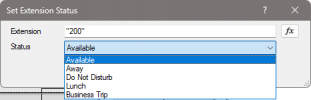
Check Status: The script checks if the extension is currently "Available" or "Away".
If Available (Enable Forwarding):
Prompt user to enter a phone number via DTMF.
Validate the input.
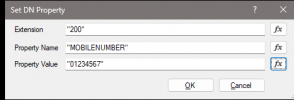
Requirement: The script needs to programmatically update the extension's "Mobile Number" property with the user input AND switch the profile to "Away".
If Away (Disable Forwarding):
Prompt user to confirm disabling.
Requirement: Switch profile back to "Available" and clear the "Mobile Number" field.
My Question: Could someone provide the correct C# code snippet (compatible with V20 API) to update an extension's Mobile Number and current Profile? I want to ensure I am using the correct methods to modify the DN properties and save them properly.
Thanks in advance for your help!
I am looking for assistance in creating a Call Flow Designer script for a 3CX V20 installation.
The Goal: I need a script that allows a specific user (Ext 160) to toggle call forwarding via a BLF key.
The Logic:
Check Status: The script checks if the extension is currently "Available" or "Away".
If Available (Enable Forwarding):
Prompt user to enter a phone number via DTMF.
Validate the input.
Requirement: The script needs to programmatically update the extension's "Mobile Number" property with the user input AND switch the profile to "Away".
If Away (Disable Forwarding):
Prompt user to confirm disabling.
Requirement: Switch profile back to "Available" and clear the "Mobile Number" field.
My Question: Could someone provide the correct C# code snippet (compatible with V20 API) to update an extension's Mobile Number and current Profile? I want to ensure I am using the correct methods to modify the DN properties and save them properly.
Thanks in advance for your help!