CFD variable session.transferingExtension missing (bug) on 3CX Version 20.0 Update 0 (Build 1494)

Status
Not open for further replies.

surawoot

Titanium Partner
Advanced Certified
Joined
Sep 13, 2022
Messages
10
Reaction score
2
Hi team,

I have identified an issue with CFD in 3CX version 20 where it cannot send values from the parameters session.transferingExtension. Initially, I attempted to use the built-in component survey with the output fields parameter. I set the variable parameter to the table below.
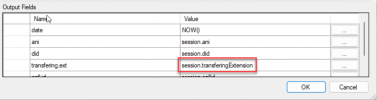
1706079694881.png

You can review my call flow log here.

1706079852001.png
All parameters seem to be working fine, except for session.transferingExtension, which is not sending any values.
Subsequently, I attempted to debug by printing this parameter to the logging on my server, but it also proved unsuccessful.
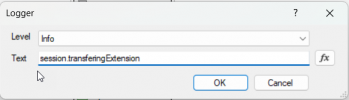
1706079747883.png
 
@Gbot@Okam could you share your case number for reference please ? Thank you !
 
  • Like
Reactions: Evolute IT
Hi,

Is there any chance an alpha or beta fixing this issue will be out by the end of July?
3CX is communicating on the mandatory upgrade of NFR licences to v20 by end of July (https://www.linkedin.com/posts/3cx_...1st-august-activity-7213450267638333442-xAxg/), but the lack of transferingExtension breaks our call flows so upgrading will break our setup.

Best regards,
Gilles

Same for us. We have opened a support ticket and are waiting for a response :) .
Hopefully, a new version will be available soon. :p
We’re really looking forward to offering our clients the benefits of 3CX v20.:cool:
 
  • Like
Reactions: Evolute IT
Same for us. We have opened a support ticket and are waiting for a response :) .
Hi Guillaume,

A new CFD project editor (compiler) is under development which fixes the issue. I was able to upgrade our NFR licence and confirm that the newly compiled CFD projects work with v20 with two changes after upgrading from v18:
  • update exceptional transfers from "to external number" in v18 to "to system extension" in v20
  • update the CFD project uploaded into 3CX (obviously compiled with the new CFD project editor)
So the upgrade from v18 to v20 is possible and simple.

Best,
Gilles
 
  • Like
Reactions: Evolute IT
Hi Guillaume,

A new CFD project editor (compiler) is under development which fixes the issue. I was able to upgrade our NFR licence and confirm that the newly compiled CFD projects work with v20 with two changes after upgrading from v18:
  • update exceptional transfers from "to external number" in v18 to "to system extension" in v20
  • update the CFD project uploaded into 3CX (obviously compiled with the new CFD project editor)
So the upgrade from v18 to v20 is possible and simple.

Best,
Gilles


For us, it's a bit more complicated than that.
The "Date & Time condition" component does not work with departments on 3CX V20. Thus, 3CX Office Hours and 3CX Out of Office Hours are not recognized by callflow.
In our case, this causes several issues, especially for clients whose schedules change on a regular basis.

Obviously, I have several 'hacks' in mind that could be used to bypass these challenges, but they don't address the underlying issue :( . More to come...


Glad to hear that you have a solution for your scenarios.
 
  • Like
Reactions: Evolute IT
Can I ask if there is an ETA for the release of the new call flow designer, or do i need to raise a support ticket to get access to it? Our IVRs are still not working as they did with V18 and I'm being pressured to solve this problem.

Cheers!
 
Can I ask if there is an ETA for the release of the new call flow designer, or do i need to raise a support ticket to get access to it? Our IVRs are still not working as they did with V18 and I'm being pressured to solve this problem.

Cheers!

I might be able to help you.

Please send me your CallFlow project privately, and I will "fix" it.
 
  • Like
Reactions: Evolute IT
I guess you have the updated tool, ah? Good for you! ;)

LOL, I added quotation marks around "fix," which probably gave me away hahaha! xD
I'm one of the lucky few who got version 20 of CallFlow Designer (unreleased).

Out of respect for 3CX, I avoid sharing it since logically, if it's not released, it's because they're not ready to offer support, even though... I haven't encountered any issues with this new version. It works great.

So, when I say > fix < (with quotation marks), I actually mean recompile with the new version, lol. :oops:


Well, what ? The guy in charge of "CallFlow" and "CRM" services at 3CX who made the modifications to support the new variables is no longer there. xD So, I'm taking credit in his place LOL! :cool: It's not like he can see my messages and know that I'm stealing his credit ! xD If you talk to him, please don't tell him! :rolleyes:
 
Don't worry, my lips are sealed! xDxDxD
 
Can I ask if there is an ETA for the release of the new call flow designer, or do i need to raise a support ticket to get access to it? Our IVRs are still not working as they did with V18 and I'm being pressured to solve this problem.

Cheers!
If you open a support ticket with 3CX and explain that you're having this issue, they will give you the updated installer with the fix, so you can just rebuild your app and get it fixed. Otherwise Guillaume is a good fellow that will do this for you.
 
I've checked this with V20U2 and V20U3 and the V20 CFD tries to get the transferingExtension from "MyCall.ReferredByDN" and its still empty. (Forwarded by using dedicated Extension with forwarding "To System extension")
 
  • Like
Reactions: Gilles (Transacom)
I've checked this with V20U2 and V20U3 and the V20 CFD tries to get the transferingExtension from "MyCall.ReferredByDN" and its still empty. (Forwarded by using dedicated Extension with forwarding "To System extension")
The session.transferingExtension variable only works when you transfer the call from a normal extension. If you're sending the call to the CFD app from another entity (queue, IVR, etc.) then it's not available. Is that your case?
 
We use a normal extension
1726488880579.png


Edit: Ok, thats weird. If you select "System extension", save it and the reopen the extension, the drop down is change to "Extension number" (From V20U3)
 
  • Like
Reactions: Evolute IT
The session.transferingExtension variable only works when you transfer the call from a normal extension. If you're sending the call to the CFD app from another entity (queue, IVR, etc.) then it's not available. Is that your case?
From the log file there are some entries like "CallPair.CallFlowCore.BuiltIn.Router.Router.89" that knows the extension that is called (Trunk DID -> Extension that forwards to CFD). Is there a chance to get this Router object inside the CallFlow?
 
Guillaume, thank you for the kind offer to rebuild our call flow. Unfortunately I know there are people from The Company watching this thread (hi guys) and I'll be in trouble if they found out i was releasing company code :rolleyes:

I did raise a support ticket and I've been blessed with the new CFD. Unfortunately it doesn't fix the issue with the transferring extension. I do however really like that the database access component now forces the use of parameters rather than allowing a concatenated string.

Benedikt, I believe we're experiencing the same problem. Our DIDs point to Users (which used to be called Extensions) and those forward to a System Extension which points to a Call Script. Within the call script we use the transferring extension to look up information that connects us to one of several product databases. Since that's blank the lookup fails.

Our call flow using the transferring extension value has worked since v12 of 3CX, so am tempted to raise a support job to ask if it can be fixed :)
 
  • Like
Reactions: Gilles (Transacom)
From the log file there are some entries like "CallPair.CallFlowCore.BuiltIn.Router.Router.89" that knows the extension that is called (Trunk DID -> Extension that forwards to CFD). Is there a chance to get this Router object inside the CallFlow?
No, you can't access that, but you have the MyCall object that can be used from a C# script and can give you some properties. Here you can see a C# script I wrote that lets you get the values of the properties attached to the call, maybe it helps you:
https://www.3cx.com/community/threa...-20-0-update-0-build-1494.124792/#post-605434
 
  • Like
Reactions: Evolute IT
I do however really like that the database access component now forces the use of parameters rather than allowing a concatenated string.
Yes, this is to improve security and avoid SQL injection, so it's good that you have and use this.

Benedikt, I believe we're experiencing the same problem. Our DIDs point to Users (which used to be called Extensions) and those forward to a System Extension which points to a Call Script. Within the call script we use the transferring extension to look up information that connects us to one of several product databases. Since that's blank the lookup fails.

Our call flow using the transferring extension value has worked since v12 of 3CX, so am tempted to raise a support job to ask if it can be fixed :)
In 3CX v20, all the routing of incoming calls has been changed. Now, when you have a forwarding rule in your Extension, the call is not really stopping by in the extension. The router logic directly skips it. And this is what causes that you don't see the extension number in the variable. I would recommend you 2 things:
1) Execute the script mentioned here, check the logs and see if there is any property attached to the call that will give you the value that you need:
https://www.3cx.com/community/threa...-20-0-update-0-build-1494.124792/#post-605434

2) If that doesn't work, maybe your DID can tell you which extension would be involved. So by checking the session.did variable you might do something.
 
  • Like
Reactions: Evolute IT
In 3CX v20, all the routing of incoming calls has been changed. Now, when you have a forwarding rule in your Extension, the call is not really stopping by in the extension. The router logic directly skips it. And this is what causes that you don't see the extension number in the variable.
This really needs to be fixed so that transferingExtension behaves as it did in v18. It is a serious regression for existing calls flows that cannot work on v20 without...
 
Status
Not open for further replies.

Forum statistics

Threads
111,973
Messages
590,071
Members
164,892
Latest member
Phone1stStop