


- Joined
- Jun 2, 2021
- Messages
- 2
- Reaction score
- 0
My client has recently installed the 3CX Live Chat plugin on his Wordpress site and on an HTML site.
Both work fine, however, there is a single piece of text he wishes to change (on the HTML site): -
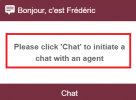
This turns out to be the replacement text for if you have "authentication" set to "none".
The Wordpress plugin has an input box which you are able to use to change this text, which he has used successfully on his WP site: -
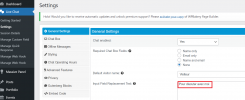
However, on the HTML site, there is no option to change this.
Upon looking at the code for callus.js (yes..... due to the lack of documentation, I had to scroll through the code line by line), it appears that this setting is actually being provided by the server itself. To prove this, I have included the ajax responses provided by both the HTML (cloud) and the WP (self hosted) server: -
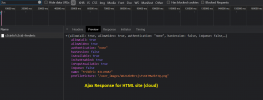
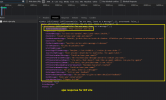
My question is -- how do I get the "dictionary" setting to appear - or even be able to modify it - in the HTML site, using the standard callus.js file and linking to the 3cx.net platform?
Thank you.
Both work fine, however, there is a single piece of text he wishes to change (on the HTML site): -
This turns out to be the replacement text for if you have "authentication" set to "none".
The Wordpress plugin has an input box which you are able to use to change this text, which he has used successfully on his WP site: -
However, on the HTML site, there is no option to change this.
Upon looking at the code for callus.js (yes..... due to the lack of documentation, I had to scroll through the code line by line), it appears that this setting is actually being provided by the server itself. To prove this, I have included the ajax responses provided by both the HTML (cloud) and the WP (self hosted) server: -
My question is -- how do I get the "dictionary" setting to appear - or even be able to modify it - in the HTML site, using the standard callus.js file and linking to the 3cx.net platform?
Thank you.


