Change of FQDN for a 3CX hosted by 3CX

gregory.b

Silver Partner
Basic Certified
Joined
Sep 28, 2020
Messages
101
Reaction score
6
Hi,

I have a question,
I have a client hosted by 3CX itself. I want to know if it is possible to change the FQDN of this 3CX or should i assume that I'll have to command a new one.

please advise.
Thank you.
 
To change the FQDN you would need to stop the hosted instance, then disconnect (release) the FQDN, and redeploy the instance.

You will not be able to use the backup as this contains the old FQDN in it. You can export your users and then reimport them after the PBX is installed.

Everything else (Queues, ring Groups etc) will need to be recreated.
 
  • Like
Reactions: Evolute IT
To change the FQDN you would need to stop the hosted instance, then disconnect (release) the FQDN, and redeploy the instance.

You will not be able to use the backup as this contains the old FQDN in it. You can export your users and then reimport them after the PBX is installed.

Everything else (Queues, ring Groups etc) will need to be recreated.
Hello,

If i lost every config it doesn't matter to me
I just want to change the FQDN

Can i do this via the Portal or should i lias with 3CX support.

And what is the delay for the config to take place ?
 
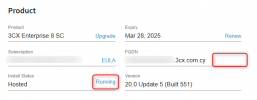
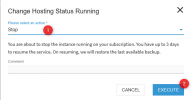
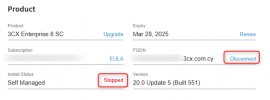
You will need to Stop the machine first, then when you see the status as Stopped, you will be able to release the FQDN

1742988932264.png

1742988967236.png

1742989065247.png

Once the FQDN is released, you should be able to setup a new system on the same key, and assign a new FQDN to it through the wizard.
 
Hello,

I did the Step But i don't have the Disconnect button to release the FQDN

Note that i have all the Right Privilege on my Portal

Can you please Advise why and what can be done ?
 
1743425357947.png

You will see here
There is not the same option as you mentioned
Why ????
 
  • Like
Reactions: NicholasP_3CX
yes the Partner Portal
But how if the 3CX is hosted by 3CX itself ?
 
yes the Partner Portal
But how if the 3CX is hosted by 3CX itself ?
Your customer has a login for his account, you need to use this account.
 
  • Like
Reactions: gregory.b
okay i was able to release it with the Customer Portal you were right

Now after that what's the step as i the option restart is unavailable

How can i redo the installation to put the New FQDN ??
 
Hello

Any feedback please am against the wall here
 
Hi,

in theory - Kick things off again as if doing fresh install as per > https://www.3cx.com/docs/manual/install/ ? and you can bind your license you have available on the account but not actively in used > designate the new FQDN as part of the 'new 3cx setup' > move forward as if a scratch-new-install (? I think ? is all you need to achieve here ?)

Tim
 

Latest Posts

Forum statistics

Threads
111,964
Messages
590,000
Members
164,869
Latest member
hpgitsupport