Solved Change Prepend ID

Status
Not open for further replies.

CRCrochester

Customer
Joined
Jan 11, 2022
Messages
4
Reaction score
1
I have 3 DID lines (SIP.us) for two different businesses. I would like to have the incoming caller ID to prepend the business name called based on DID but can't figure out what I have to change to get that to happen. I have prepend set in the contacts area, and have also named my incoming rules according to business name, but that all still say the same incoming caller id prepend no matter which number is called.

Any help with this would be appreciated.
 
You need to set that in the Inbound Rules
 
  • Like
Reactions: NickD_3CX
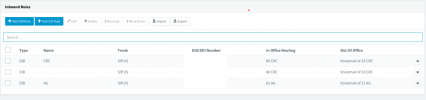
Where? I have inbound DID rules for all of my numbers and each are named by business, but still everything comes up as the same name. What am I missing? I included a screenshot of my incoming rules (DID's censored). It's the bottom DID I am trying to get to come up as "AG" prepended on incoming callsScreen Shot 2022-01-18 at 4.46.33 PM.png
 
Hi @CRCrochester,

What version of the PBX are you running?

What client are you using (new Desktop App / Web Client / mobile clients etc)?
 
@CRCrochester ,

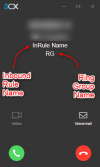
What will appear is the Name you give the Inbound Rule, so I see you have 1 rule without a Name. Name that something too, then provide the information @VasilisV_3CX asked.

It should appear something like this:
1642599210097.png
 
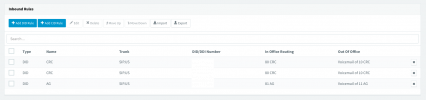
I have named the 1 unnamed inbound rule, when I call into the 3rd line (named AG) it is still coming up on caller ID as CRC. It comes up this way on the Android app, iPhone app, and our Yealink phones.

I am using PBX version 18 update 2 (build 314) which is cloud hosted by 3CX.

When calling in on the AG named phone number, on all devices I see "CRC:City,State PhoneNumber" I have no idea where it is pulling that CRC from as the rule is named AG.

Thanks for the help.
Screen Shot 2022-01-19 at 8.29.54 AM.png
 
Can you please make sure that all your DIDs are entered in the e164 number format?
https://www.3cx.com/docs/us-sip-trunk-sipus/#h.1t497tcn2wuw

Once you adjust the number format of all DIDs, check again, because I have a feeling that Inbound Rules in general might not be being followed correctly.
 
  • Like
Reactions: Evolute IT
That was it. Thank you for the help.
 
  • Like
Reactions: NickD_3CX
Glad we could help! :)
 
Status
Not open for further replies.

Forum statistics

Threads
111,974
Messages
590,081
Members
164,899
Latest member
mazet