- Joined
- Mar 31, 2022
- Messages
- 10
- Reaction score
- 1
Hi,
I am implementing 3CX for a school where all the teachers use the Webclient and there is about 200 users and 40 handsets.
They have asked if it is possible for the following:
I have also seen that exactly what they need is available in the Webclient and can be set by each user individually, under Settings > Status > Status Scheduler > Use Specific Hours, but we would like to set it as an admin for multiple users at the same time rather than the users setting this up themselves as this is just going to cause issues and most likely a lot of overhead to a busy support team.
I have also seen that in the latest releases this has been discussed, as it seems that the option under the extension settings, Auto Switch, was removed from the management console. I saw some discussion about using a Group to accomplish the same thing, although not been able to work out how. @Nick Galea
https://www.3cx.com/community/threa...eptionist-view-status-scheduler.114872/page-2
It sounded like a group needed to be created, and then the user would be set as a manager of that group. The user would then logon to the Webclient and then there should be an option called "Office Settings" where the Status Schedule could be set for the entire group, although there was some mention of StartUP so I'm a bit confused quite what the above thread was referring to.
Any help would be appreciated, andif you could provide some detailed instructions, if it's possible, that would be great. this client is due to go live with 3CX Friday 9am and would like to have this in place by then.
I am implementing 3CX for a school where all the teachers use the Webclient and there is about 200 users and 40 handsets.
They have asked if it is possible for the following:
- Change the status of a group of extensions to DND automatically at various times during the day, customisable for each day of the week. For instance 09:00-11:15, 12:45-14:15, 14:45-16:00. These times would be when they are teaching so that Reception and other can see they are busy and the phone doesn't ring disturbing the lesson.
- Have a custom Status such as "Teaching" as the above schedule is followed
- Ideally set this per GROUP of extensions/users so users can be added and removed from the group as required.
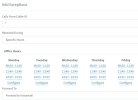
I have also seen that exactly what they need is available in the Webclient and can be set by each user individually, under Settings > Status > Status Scheduler > Use Specific Hours, but we would like to set it as an admin for multiple users at the same time rather than the users setting this up themselves as this is just going to cause issues and most likely a lot of overhead to a busy support team.
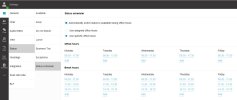
I have also seen that in the latest releases this has been discussed, as it seems that the option under the extension settings, Auto Switch, was removed from the management console. I saw some discussion about using a Group to accomplish the same thing, although not been able to work out how. @Nick Galea
https://www.3cx.com/community/threa...eptionist-view-status-scheduler.114872/page-2
It sounded like a group needed to be created, and then the user would be set as a manager of that group. The user would then logon to the Webclient and then there should be an option called "Office Settings" where the Status Schedule could be set for the entire group, although there was some mention of StartUP so I'm a bit confused quite what the above thread was referring to.
Any help would be appreciated, andif you could provide some detailed instructions, if it's possible, that would be great. this client is due to go live with 3CX Friday 9am and would like to have this in place by then.