- Joined
- Dec 21, 2020
- Messages
- 1
- Reaction score
- 1
The most recent update has fundamentally broken meeting invites for our users.
The e-mail system we are using is Exchange with some users using Outlook but also with native e-mail clients on mobile phones and Outlook Web Access.
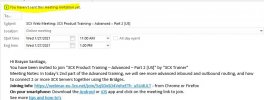
With the latest changes invites are simply not showing in the mobile app. In OWA the meeting thinks it's in the wrong place and tells users that "This item must be returned to its original location before it can be viewed" and is showing as coming from the user themselves rather than the originating user. In Outlook it shows up as if the user was trying to create a meeting but hadn't sent it. The meeting originator does not seem to be getting anything to show they have created a meeting.
I also note, from another thread, that this change seems to have broken functionality for Zimbra users.
I appreciate that there was a thread which was blaming changes in Outlook since the 2007 version with a registry based workaround. This workaround does not work for us and, even if it did, would only have fixed the issue for some of the clients.
The fact that things were working for people and now they're not, due to a change that 3CX have made, regardless of whether 3CX think that something in Outlook has been broken for 13 years, is a big problem.
Please can you stop blaming changes in software from 13 years ago, which I think we can safely assume are never going to be addressed, for an issue which has been caused by 3CX changing the functionality of their system and do something to address this or roll back those changes?
This issue is large enough for our user base that if it's not addressed we will have to find another platform to use and will be seeking reimbursement for the costs we have paid as the product is no longer fit for purpose and doesn't work as it did when we were evaluating and initially using it.
The e-mail system we are using is Exchange with some users using Outlook but also with native e-mail clients on mobile phones and Outlook Web Access.
With the latest changes invites are simply not showing in the mobile app. In OWA the meeting thinks it's in the wrong place and tells users that "This item must be returned to its original location before it can be viewed" and is showing as coming from the user themselves rather than the originating user. In Outlook it shows up as if the user was trying to create a meeting but hadn't sent it. The meeting originator does not seem to be getting anything to show they have created a meeting.
I also note, from another thread, that this change seems to have broken functionality for Zimbra users.
I appreciate that there was a thread which was blaming changes in Outlook since the 2007 version with a registry based workaround. This workaround does not work for us and, even if it did, would only have fixed the issue for some of the clients.
The fact that things were working for people and now they're not, due to a change that 3CX have made, regardless of whether 3CX think that something in Outlook has been broken for 13 years, is a big problem.
Please can you stop blaming changes in software from 13 years ago, which I think we can safely assume are never going to be addressed, for an issue which has been caused by 3CX changing the functionality of their system and do something to address this or roll back those changes?
This issue is large enough for our user base that if it's not addressed we will have to find another platform to use and will be seeking reimbursement for the costs we have paid as the product is no longer fit for purpose and doesn't work as it did when we were evaluating and initially using it.