Changing 3CX IP - Will it cause issues?

Status
Not open for further replies.

drowland

Free User
Joined
Jun 21, 2022
Messages
2
Reaction score
0
We are talking about moving our 3CX from an internal VM to an Azure hosted VM, and one of our SysAdmins was adamant we could not change the internal IP of the 3CX PBX without causing issues. This sounds silly to me, but I said I would look into it. As long as our phones/users are using FQDN for the desktop client, web client, and desk phones, then we shouldn't have an issues as long as the FQDN is updated and the NAT configuration is updated, once moved to Azure, should we?
 
Before you move you should disable the option to restrict management console to IP temporarily.

Take your full backup, turn off your old PBX.

Boot up the new VM as per https://www.3cx.com/docs/recommended-hardware-specifications-for-3cx/

restore your backup, make sure you get all green in your dashboard.

I would recommend using an SBC to connect your phones to your PBX.

Depending on your license, it may take some time for the DNS to update for your FQDN.

  • Standard and Professional licenses have a TTL of 6 hours
  • Enterprise Editions set the TTL to 300 seconds (lowest possible value)
Fairly simple exercise to do, tell your admin not to fret.

You would need to reprovision your phones based on the new set up.
 
If you need to change the IP Address, or FQDN then you need to back up without license which is required. I just did this as I switched from Windows running 3CX V16 to Linux 3CX V18.

Also, you will need to make sure you have access to your customer login to "disconnect" the FQDN for the existing license. I would recommend using the 3CX provided FQDN to make the transition easier and not reuse the OLD FQDN. The long TTL would make the FQDN change a process fun.

With new FQDN not all phone models will likely figure out the provisioning change with reboot and re-provisioning thus a reset of each phone might be required. You might want to get a FREE Standard 8 SC License and do some testing so you can figure out the edge cases. Again, depending on your SIP Trunk provider you could split off a DID for testing all of this.

To solve all of the NAT and Firewall issues I would definitely implement the 3CX SBC. It also saves you bandwidth as extension to extension calling the audio stream is local.
 
Last edited:
If you need to change the IP Address, or FQDN then you need to back up without license is required. I just did this as I switched from Windows running 3CX V16 to Linux 3CX V18. Also, you will need to make sure you have access to your customer login to "disconnect" the FQDN for the license. I would recommend using the 3CX provided FQDN to make the transition easier and not reuse the OLD FQDN. The long TTL would make the FQDN change process fun.
You dont need to exclude this - this only applies if you're changing your license.

Perform a full backup and restore.

the IP will update on the FQDN.
 
I would error on the side of caution and not backup the license. When doing it this way you can change the IP and FQDN settings easily. With the long DNS TTL for STD and PRO a new FQDN will make things easier IMHO.

Again, I would get a FREE license and do some test migrations to make sure you have the steps down before you migrate and do it a couple of times. I ran into a lot of interesting issues that I did not anticipate. With help from a few "friends" in the forums I got the answers. Luckly, I had time over the weekend and was doing all of this with VMs thus I could easily switch back if and did so twice.

When I migrated from Windows V16 to Linux V18 it found that three times was the charm. The issue was not Linux it was the details of the migration. What those edge cases.
 
As long as our phones/users are using FQDN for the desktop client, web client, and desk phones, then we shouldn't have an issues as long as the FQDN is updated and the NAT configuration is updated, once moved to Azure, should we?

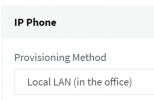
Correct in theory. In practice though the desk phones will not work because you probably have them set up as "LAN" mode (contacting the PBX via private IP), but and now the PBX is in the cloud and they will need to contact it via public IP.
1655885307567.png

There are two main solutions:

1. VPN your cloud VM into your LAN ( you have to figure it out by yourself and test it ) so that the phones still think the PBX is exactly where it used to be. This is not something we explicitly support, but if you can make it seem like the cloud VM is in your LAN then you should not have issues because we do support LAN deployments.

2. Use a 3CX SBC. It will require that you factory reset and reprovision the phones once, and that you are using supported models that are not EOL. This needs to be done once, but your phones will work reliably going forward and you won't have to worry about NAT, ALG, or DNS. You can even migrate your VM to another cloud platform later and they will still continue to work without any changes needed.

Note: the apps should be fine, they don't need any special config if your 3CX Firewall Checker passes.
 
Status
Not open for further replies.

Forum statistics

Threads
111,974
Messages
590,083
Members
164,900
Latest member
Silent_Guru