Changing inbound Caller ID

Status
Not open for further replies.

JT PFG

New User
Joined
Feb 14, 2022
Messages
3
Reaction score
1
Good day!

I am using the Call Flow Designer to create a IVR. When the call is passed from the IVR to a ring group, I want to change the caller ID of the inbound call before the ring group, so that the ring group knows its for the ring group and not a personal call? Is this possible?
 
As far as I'm aware, caller ID reformatting still takes place on a per trunk basis, when the call first enters the PBX, so not after an IVR.

https://www.3cx.com/docs/cid-reformatting/

If a caller is given the opportunity to select, and chooses the ring group option in the IVR, doesn't that indicate that it's not a personal call?
 
Last edited:
There's two solutions:
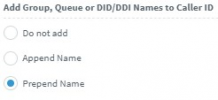
1. Use the Append/Prepend Name, which should add the RG name to the CID, and if using the DesktopApp, it will be shown clearly below the CID. On phones, it's appended or prepended to it.

2. Use "Attach Call Data", and set "public_override_displayname" to whatever you want. (If my memory serves.) (might be "...display_name")
 
  • Like
Reactions: ChrisC_3CX
1. Use the Append/Prepend Name, which should add the RG name to the CID, and if using the DesktopApp, it will be shown clearly below the CID. On phones, it's appended or prepended to it.
I think this would be the easiest way to achieve this, the option can be enabled under Advanced >> Contacts >> Options:
1645449574134.png

Bear in mind that this will also add the Inbound Rule name, but, you can leave the Inbound Rule name field empty if you prefer that it does not show.
 
  • Like
Reactions: Evolute IT
Status
Not open for further replies.

Forum statistics

Threads
111,974
Messages
590,083
Members
164,901
Latest member
Silent_Guru