changing inbound displayed callerid

Status
Not open for further replies.

wa4zlw

Free User
Joined
Mar 23, 2019
Messages
59
Reaction score
2
having to deal with the voip.ms issue this week I now need to configure the inbound not to display the called number just the caller name and caller number since it's too long to display with the number dialed first.

I tried rearranging or changing some of the inbound parameters but that makes calls not complete.

Can any please assist?

Thanks leon
 
having to deal with the voip.ms issue this week I now need to configure the inbound not to display the called number just the caller name and caller number since it's too long to display with the number dialed first.

I tried rearranging or changing some of the inbound parameters but that makes calls not complete.

Can any please assist?

Thanks leon
You can't hide the caller ID.

But you can reformat it using the patterns in Trunk > Caller ID.
 
You can't hide the caller ID.

But you can reformat it using the patterns in Trunk > Caller ID.
Hi frederick...

currently its displaying the following

<called number> <name of caller> <number of caller>

i want to remove <called number> or move it to the end of the display

Leon
 
Hi frederick...

currently its displaying the following

<called number> <name of caller> <number of caller>

i want to remove <called number> or move it to the end of the display

Leon
Oh, that's the DID tho.

Did you give a name to your inbound rule?

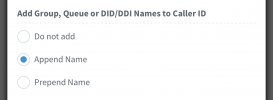
Otherwise, check the config in Advanced > Contacts > Options. There's the Append/Prepend Ring group/Inbound rule name.
 
contacts shouldnt have anything to do with it. The trunk/DID is providing the cname/callerid and 3cx is displaying it along with the inbuned number dialed. that's what I want to remove from what's displaying on the phones. It's been a few years since i've played with 3cx and this has always been an irritant since you don't see who is really calling since the called number takes up most of the callerid displayed info
 
contacts shouldnt have anything to do with it. The trunk/DID is providing the cname/callerid and 3cx is displaying it along with the inbuned number dialed. that's what I want to remove from what's displaying on the phones. It's been a few years since i've played with 3cx and this has always been an irritant since you don't see who is really calling since the called number takes up most of the callerid displayed info
Yes it has to do with it.

2D114242-6FE9-4456-B654-3650AB0DED79.jpeg
 
3CX by default, does not display the called number (DID number), on the sets, unless you've added the number to a DID rule, and instructed 3CX to add it.
 
Last edited:
  • Like
Reactions: Evolute IT
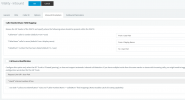
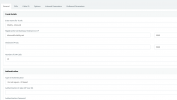
ok here's my configuration on the trunk
1632586298920.png

1632586346705.png
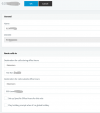
sample inbound route1632586467596.png

on the inbound vitelity trunk are all the DIDs coming from them

while we're at it vitelity is getting a 600 response from the pbx now after all my DIDs were ported last night. One of them was the pbx firewall blocked them. that fixed failover on their end but not getting any calls
i believe these two things are related.vitelity is providing CNAMES on each inbound call.

thoughts? thanks leon
 
also all my phones are registered and I can make intrapbx calls
 
ok here's my configuration on the trunk
View attachment 24689

View attachment 24690
sample inbound routeView attachment 24691

on the inbound vitelity trunk are all the DIDs coming from them

while we're at it vitelity is getting a 600 response from the pbx now after all my DIDs were ported last night. One of them was the pbx firewall blocked them. that fixed failover on their end but not getting any calls
i believe these two things are related.vitelity is providing CNAMES on each inbound call.

thoughts? thanks leon
You see. In your Inbound Rule, the name field has the DID in it.

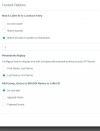
When the option I mentionned here is enabled, it will add that name. Go to Console > Advanced > Contacts (yes, you don't think it's related but it is) > Options (button in the toolbar). Check the option, it's probably set to Prepend.

You can either disable it, OR, remove the name in the inbound rule (it's optional.)
 
ah gotcha sorry for being a little thick this morning, now afternoon

1632588641047.png
ok that worked...any ideas on whyt he pbx things there are no extensions alive except one now my original vitelity did. I deleted the vitelity inbound trunk and recreated it and then recreated all the inbound routes.
i rebooted phone and they're all registered. I'm stumped
 
this is in logs

09/25/2021 1:34:30 PM - [CM503019]: Call(C:153): Rejected! Line is 'Busy' because number of simultaneous calls per line Line:10000<<202####### is limited by Administrator

the pbx has 10 simultaneous calls nothing changed there...obviously this is something stupid and I can't see it
 
this is in logs

09/25/2021 1:34:30 PM - [CM503019]: Call(C:153): Rejected! Line is 'Busy' because number of simultaneous calls per line Line:10000<<202####### is limited by Administrator

the pbx has 10 simultaneous calls nothing changed there...obviously this is something stupid and I can't see it
Check the sip trunk, "Number of SIM Calls" what's set there? And what's the license SC number?
 
set to 10 for some reason the calls are coming in on an outbound trunk only which I have for tollfree
 
all the inbound routes point to vitelity - inbound yet the call is coming in on alzacar tollfree
 
it's like the pbx is confused I will try a reboot
 
was getting this too

Device 202#####@(Ln.10000@Vitelity - Inbound) had no available outgoing trunk(s) to call(152)

A trunk failover occurs when the maximum amount of calls available via the trunk have been exceeded.
 
At this point, I strongly suggest your reach out to a 3CX Partner (like us) to help you directly. There has to be a reason and it's probably configuration, but if your knowledge of 3CX and SIP is limited, a partner will be able to dig deeper.

This sounds like inbound config errors and then outbound rules misconfig, but I cannot say for certain without having a look at the complete system.
 
ok thanks i'll plug away it's weird that calls are coming in outbound trunks. Everything started when I yanked out the voip.ms rules yesterday and things seemed to be working as vitelity was porting them over them something went down over night.

also, I notice I tried to update to the new version and it failed. need to understand taht too but not now.

thanks
 
  • Like
Reactions: Evolute IT
ok thanks i'll plug away it's weird that calls are coming in outbound trunks. Everything started when I yanked out the voip.ms rules yesterday and things seemed to be working as vitelity was porting them over them something went down over night.

also, I notice I tried to update to the new version and it failed. need to understand taht too but not now.

thanks
DM me if you wish us to go deep into it, but it won't be free tho...

It could be as simple as config issues related to having the two trunks and having switched between them.
 
Status
Not open for further replies.

Forum statistics

Threads
111,993
Messages
590,175
Members
164,931
Latest member
admintest