- Joined
- Nov 25, 2022
- Messages
- 7
- Reaction score
- 0
Hello,
I got errors for some of my users recently.
I would like to know where and how I can configure my 3cx console to allow users to use the uncomplex username and password for authentication.
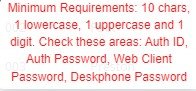
I changed the password for one of the users, but I don't have access to the web console of that IP phone. So, I would like to reverse my changes, but it says you cannot set a password that is not complex. Therefore, I would like to disable this feature for now. How can I do that?
It would be great if you could help me.
Thank you in advance!
I got errors for some of my users recently.
I would like to know where and how I can configure my 3cx console to allow users to use the uncomplex username and password for authentication.
I changed the password for one of the users, but I don't have access to the web console of that IP phone. So, I would like to reverse my changes, but it says you cannot set a password that is not complex. Therefore, I would like to disable this feature for now. How can I do that?
It would be great if you could help me.
Thank you in advance!