changing the default provisioning "select interface"

Status
Not open for further replies.

rc179

Silver Partner
Basic Certified
Joined
May 1, 2020
Messages
97
Reaction score
11
I need all the phone to use the URL (not the IP address). I know I can set this in Extensions - Phone Provisioning under "Select Interface", but I really need this to be the default when phones are added. It's a must have with a LAN failover, and it won't always be me adding a phone. So I need it to be simple and consistent. If the system fails over, the last thing I need is only half the phones working.

Anyone? please.

I saw a reference to changing the DEFAULTLOCALIP to make this happen, but there was no response on whether this parameter was used elsewhere, which could have serious consequences, and the name doesn't make think this is what it was meant for.

Thanks
 
The first thing you need to do is to make sure that during the installation of 3CX, when you were asked if you have an internal DNS, that you selected "Yes" and then proceeded to type in the internal FQDN.

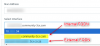
Then in the drop-down you will see something like this:
1594795812476.png

Depending on what you select, this value will also be put in the "SIP Server" settings in the provisioning file, and so is what the phone will use.

If you don't have 2 FQDNs in the drop-down, most likely during the install you did not select that you had an internal FQDN. In this case, you need to find a suitable down-time, take a full back without the "License Key Information, FQDN & Conference" option, re-install 3CX and this time choose the "Internal DNS" option and proceed from there.
 

Attachments

  • 1594795620709.png
    1594795620709.png
    22.6 KB · Views: 22
The first thing you need to do is to make sure that during the installation of 3CX, when you were asked if you have an internal DNS, that you selected "Yes" and then proceeded to type in the internal FQDN.

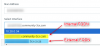
Then in the drop-down you will see something like this:
View attachment 17021

Depending on what you select, this value will also be put in the "SIP Server" settings in the provisioning file, and so is what the phone will use.

If you don't have 2 FQDNs in the drop-down, most likely during the install you did not select that you had an internal FQDN. In this case, you need to find a suitable down-time, take a full back without the "License Key Information, FQDN & Conference" option, re-install 3CX and this time choose the "Internal DNS" option and proceed from there.
I mentioned this in my post, what I need is to change the default.
 
I see, sorry, must have misunderstood. Unfortunately no recommended way of doing that, apart from individually of course.
 
I see, sorry, must have misunderstood. Unfortunately no recommended way of doing that, apart from individually of course.
Maybe you can answer an extension of this situation.
I did do the configuration for a private, inside, DNS server. And I do have the two URL choices. Should the system have registered an A record on my DNS server during the install? It didn't and I know I can create a static entry but I would think that will be a problem when I get to setting up the Failover.
 
When you choose during the installation to use an Internal FQDN, you must create the Local DNS Entry.
In regards to Failover, you realistically have 2 options I can think of:
  1. you can create a failover script than when a failover occurs, it will re-rwite the Local DNS entry to the new Server IP.
  2. You could set 2 A Records on your Internal DNS, each pointing to the Active and Passive server. Most IP Phones I am aware of, will try to connect to each of the IPs, so when the Passive server comes online, they should connect there. I have not tested this, but could work.
 
I know that with a cloud based failover, using the 3CX URL, it handles everything on it's own.
And it was my understanding that LAN based Failover was a supported implementation. So I assume whatever script I need is available from 3CX. Where can I find this? It's a Windows AD DNS server.

And now that I think about it, if I create a static DNS entry (as opposed to a dynamic registration), what kind of script run on the 3CX PBX would be able to change the DNS entry?
 
So I assume whatever script I need is available from 3CX. Where can I find this? It's a Windows AD DNS server.
Your assumption is not quite correct, however we do mentioned this here: https://www.3cx.com/docs/failover/#h.nod9zuqmoydm
There are some samples there to get you started, but you need to ultimately create the scripts if your own Local DNS is going to be involved.
 
OK, those are all windows bat files. I'm looking into some linux scripts that are supposed to change DNS entries on a Windows DNS server, which is what I have, if I get it working I'll post it here for others.

Another clarification if you could. I thought with the cloud based failover and 3CX URL, it would fail over, and if the primary came back on-line, it would automatically role back to the primary. Is this correct? I thought it did when I tested that scenario, but now I'm not sure.

And in a LAN Failover with a private DNS I don't see how I can run a script when the primary comes back online and have the DNS change back. It almost looks like I would have to manually change the DNS back and role the services back to the primary. This can't be right, can it?
 
I thought with the cloud based failover and 3CX URL, it would fail over, and if the primary came back on-line, it would automatically role back to the primary. Is this correct? I thought it did when I tested that scenario, but now I'm not sure.
No, in the current implementation that will not happen. You will have to switch the servers back "manually", but settings the Secondary back to Passive, and the Primary back to Active. The mainly was to avoid potential cases where the Primary would be down intermittently, resulting in the failover going back and forth.

And in a LAN Failover with a private DNS I don't see how I can run a script when the primary comes back online and have the DNS change back. It almost looks like I would have to manually change the DNS back and role the services back to the primary. This can't be right, can it?
Indeed, however seeing that as explained above, the "fail back" to the initial configuration requires some manual intervention, the script to adjust the DNS entries can be executed manually.
 
So hopefully one last question, is there a document showing the failback process?
 
Not quite, but the best way I suggest is, if your Secondary Server is currently your Active, and your Primary is offline:
  1. Fix whatever is wrong with the Primary server while users are working via the Secondary
  2. Once in the Management Console, set your Primary to "Passive".
  3. Take a backup from your Secondary/Active Server and restore it onto your Primary/Passive (this is that you can restore call history,recordings, etc that the secondary has gathered while primary was down - if of not interest, it can be skipped)
  4. From the Failover menus of both Primary and Secondary Servers, in close succession, Set the Secondary to Passive and the Primary to Active.
  5. Also remember to have any script ready to alter any Local DNS entries if that is required (3CX FQDNs should be updated to the new Public IP, if that is changed, within 5 minutes as per DNS TTL).
 
Status
Not open for further replies.

Forum statistics

Threads
111,954
Messages
589,921
Members
164,851
Latest member
DrunkeMeister