Changing the URL to match the new company name

Status
Not open for further replies.

Clint Reed

Silver Partner
Advanced Certified
Joined
Oct 26, 2017
Messages
60
Reaction score
13
Hello

I have a client who's company name changed. We want to change the x-company.3cx.us url to Y-company.3cx.us. It is self-hosted in AWS. Does the following still apply:

Old post on the topic from 2020 Yanish:
Please note that in order to change FQDN you will need to re-install the system. To do so:

  • Create a backup of the system without license and FQDN information
  • Un-install the PBX
  • Access the customer portal and release the key from the current FQDN
  • Re-install the system using the license key and your own FQDN.
Please note that you will need to also provide a certificate for your FQDN and that custom FQDNs can only be used with a PRO or Enterprise edition key.


Thanks
Clint

FYI the system I select is not the one I will be changing, your Forum only shows me one of our dozen systems.I can't seem to find how to add others.
 
The above steps are required if you want to change the FQDN. The license key is bound to the FQDN and cannot be changed. You need to release it first and then re-install. Of course the backup must be created before.
 
  • Like
Reactions: Clint Reed
I am needing to do the same.

My system is hosted by 3cx. In one of the more recent updates, the link to the host site has been moved and I cannot find it. Does anyone know where the link went?

And I did a system back up, but there wasnt an option to back up without license and FQDN info. Can someone please point me to instructions to do that?

Thanks in advance.
 
  • Like
Reactions: TLCtech
Thanks. This was the newest thread I was finding. This both helps immensely, and is also disheartening.
Per other 3CX posts v20 does not have the ability to back up and restore without a license+FQDN, so the result is one must start from scratch, I'm afraid.
https://www.3cx.com/community/threads/v20-change-fqdn.124814/post-595261
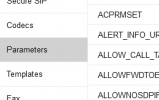
You can use the parameters BACKUP_[many] to decide what is included. This only work for scheduled backup I believe.
 
  • Like
Reactions: bitn2
Can it restore into v20 though?
 
You can use the parameters BACKUP_[many] to decide what is included. This only work for scheduled backup I believe.
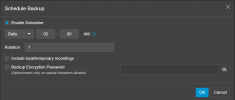
Im not seeing that option in the gui, and it being 3cx hosted, I dont have ssh access iirc.

1721762996097.png
 
Im not seeing that option in the gui, and it being 3cx hosted
Parameters aren't available in 3CX hosting. (This thread is in the self-hosted section)
1721764223193.png
 
  • Like
Reactions: Evolute IT
:) I usually read via "new posts" or the email alerts so I have to remember to check where I'm answering :)
 
Status
Not open for further replies.

Latest Posts

Forum statistics

Threads
111,792
Messages
589,002
Members
164,582
Latest member
Crissy84