VSC Forum User Joined Mar 16, 2020 Messages 110 Reaction score 14 Apr 26, 2021 #1 How can I configure our chat widget that it shows our customers that we are currently offline? Now the widget only shows "all agents are busy".
How can I configure our chat widget that it shows our customers that we are currently offline? Now the widget only shows "all agents are busy".
VasilisV_3CX Customer Joined Jan 12, 2021 Messages 4,360 Reaction score 951 Apr 26, 2021 #2 Hi @VSC, How are you using Live Chat, is this with a Wordpress install or the HTML code generator embedded in your site?
Hi @VSC, How are you using Live Chat, is this with a Wordpress install or the HTML code generator embedded in your site?
VSC Forum User Joined Mar 16, 2020 Messages 110 Reaction score 14 Apr 27, 2021 #3 We're using the HTML code generator.
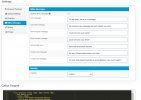
VasilisV_3CX Customer Joined Jan 12, 2021 Messages 4,360 Reaction score 951 Apr 27, 2021 #4 Hi @VSC, Have you edited the default text in the HTML editor? I believe the section you'd need to change it in is the Offline Messages section. Also note that for this to work, the extensions associated to the Live Chat in 3CX will need to be logged out.
Hi @VSC, Have you edited the default text in the HTML editor? I believe the section you'd need to change it in is the Offline Messages section. Also note that for this to work, the extensions associated to the Live Chat in 3CX will need to be logged out.
VSC Forum User Joined Mar 16, 2020 Messages 110 Reaction score 14 Apr 27, 2021 #5 Hi @VasilisV_3CX, thanks for your reply and your screenshot. I havn't seen this screenshot yet. Does it belong to V18. We're currently using V16.
Hi @VasilisV_3CX, thanks for your reply and your screenshot. I havn't seen this screenshot yet. Does it belong to V18. We're currently using V16.
VasilisV_3CX Customer Joined Jan 12, 2021 Messages 4,360 Reaction score 951 Apr 27, 2021 #6 No, when you use the HTML generator here, you can click: "Customize more? Click here." underneath the code that is generated, which will provide you with more options.
No, when you use the HTML generator here, you can click: "Customize more? Click here." underneath the code that is generated, which will provide you with more options.