Checking Voicemail remotely

Status
Not open for further replies.

Dewayne Orender

Customer
Joined
Apr 5, 2022
Messages
21
Reaction score
3
Hello,
I have been trying to figure out a method to have multiple personnel to check voicemails remotely. I have seen ways to do it through the digital receptionist or the ring groups to review voicemails remotely.

The number is NOT the operator line. Is there a step by step on the most recent version of 3CX.

Thanks in advance for any guidance. Need more information please let me know.
 
If you have a PSTN number you can dedicate to remote voicemail access (or even one that is use for something else), then there is a method that I use, that works pretty well. Send the callers to a dummy extension first, and make use of caller ID forwarding to send the (selected) caller(s) to the 3CX VM number. They then have to enter their extension number and PIN to access messages. Any other caller whose number is not on the list, can be sent elsewhere, or end the call.
 
Lee,
In my particular situation, the number dummy ext would be like 2100 and the actual extension would be like 2140 as examples. In the 3cx it would be extension 2100 as the Voicemail and ext 2140 as the actual phone number. What about the VM that is already on 2140? Does it merge with 2100 or is it separate VMs? The other thing is how does the user connect to the 2100 VM remotely?
Thanks for your help.
 
PSTN number (or DID)---> dummy ext (forwarding rules/Exceptions- add caller ID of person(s) wanting access to VM, route to 999 (or your VM number))
All other callers to that extensions should be forwarded to end call, or something else, like reception.
 
Lee,
Ok thanks for the tip. But doesn't the solution above require the person to use an desk phone (in this case a Yeolink 42S? Is the VM of 999, for any number or just the individual desk phone in question?
 
Hello,
I have been trying to figure out a method to have multiple personnel to check voicemails remotely.
Maybe I'm misunderstanding something, but if a caller dials the voicemail ext. (9999 if 4 digits) they can enter an extension and PIN.
 
When you dial 999 (or what ever you have set the VM system number to be), and 3X sees the originating extension number , then you will be asked for the PIN for that mailbox. If you press #, during the initial message, you will be asked for an extension number, and then the PIN.

This allows you to access any other mailbox that you have the PIN for. If a call to 999 does not include the extension number such as the call originating from outside, then you will be asked to enter the extension number, and then the PIN, as 3CX does not know who you are.
 
Lee,
In the quoted statement you started with "When you dial 999 (mine is 9999) and the 3X sees the originating extension number" - this is the part I'm lost. Remotely in my case would be anything away from the the local network. Call into the number from home/Cell, for example. I dial the Caller ID directly, I get my VM to pick up, the immediately #9999 (also tried just 9999) but no prompt on Extension Number or PIN. Not sure what I am missing?
When you dial 999 (or what ever you have set the VM system number to be), and 3X sees the originating extension number , then you will be asked for the PIN for that mailbox. If you press #, during the initial message, you will be asked for an extension number, and then the PIN.

This allows you to access any other mailbox that you have the PIN for. If a call to 999 does not include the extension number such as the call originating from outside, then you will be asked to enter the extension number, and then the PIN, as 3CX does not know who you are.
 
You need to dial into something that allows dialing an extension, such as a digital receptionist. Or route an incoming number/DID to x9999. Somehow, the call has to get to x9999. :)

After you're connected to x9999 then you'll hear the prompts.
 
Thank you Steve and Lee, I tried it and finally got it to work. For future reference the way to get your extension to work:
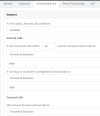
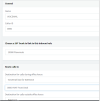
Have a valid phone number - Add it to an "Voicemail only" Extension - Go to the Forwarding Rules Tab and with both internal and external calls Forward to Extension (my case 9999).
1663003558364.png
 
If you forward all numbers calling the DID you've chosen, then anyone can have a go at getting into your VM system. If you base the forwarding on caller ID, then you can restrict the outside callers that reach 9999.
 
Lee,
This screenshot is only one extension the "Voicemail" ext. If the user has the number, the EXT they want to connect to and the PIN for each EXT then they can get through. Is there a known vulnerability? Did I miss something?
 
I simply set the dummy extension (that has no voicemail enabled), to use call forwarding based on the originating number, to be forwarded to the VM system.

As I posted earlier... PSTN number (or DID)---> dummy ext (forwarding rules/Exceptions- add caller ID of person(s) wanting access to VM, route to 999 (or your VM number))

If you simply forward all calls from the dummy extension to VM, then you open yourself up to hack attempts. It is all going to depend on how many people require access as there is a limit to the number caller ID forwarding yu can put in. I use the PSTN number for other functions, so only calls originating from certain numbers are able to access VM.
 
Lee,
This question is for my understanding:
The Caller ID would limit which people can access the voicemail system and we could use External numbers to add, but if I remember correctly just one. Maybe a combination of Inbound and Outbound rules would limit the number of possible usable mobile numbers. With our situation, we have both on-site and mobile devices that would need to check at least one EXT if not many extensions. We have multiple "screeners" that check one number, and each of them have their own lines for other purposes. The issues I would have is the screeners change out frequently and I would need to recall which numbers would go to which person added to the forward to mobile number. We already have a "white pages" internal to the organization, just seems to be a bit much to administer with the other projects and issues that arise.
 
Yes, there is a limit of CID forwards that an extension can do, so it may not be a good fit in your situation.

With our situation, we have both on-site and mobile devices that would need to check at least one EXT if not many extensions. We have multiple "screeners" that check one number, and each of them have their own lines for other purposes. The issues I would have is the screeners change out frequently and I would need to recall which numbers would go to which person added to the forward to mobile number.
I'm not certain is you are clear on how this should work. If you have a PSTN number (a DID) and you have, say, 10 mobile users that have to check not only their own, but any voicemail, they call that number. As long as their originating number is added to the dummy extension CID forwarding, to 9999, they will be able to access any voicemail box on the system if they know the PIN.

When they call they will be presented with a request to enter the mailbox number, and then the PIN. Any phone number that is not in the CID forwarding, can be sent elsewhere. This actually allows you to use a number that is used for other purposes, perhaps a little used fax line.
 
Thanks Lee, Much appreciated. I'm going to go back a little bit and asked if this opened up to vulnerabilities. You made mention of hack attempts. Do you know how that would work? You have to have all three to get in. The number to connect, the EXT, and the PIN to open the voicemails. Is there something I am missing. Thank you for taking the time to educate me, I know going back and forth can be a pain! I believe it is simply just a misunderstanding on my part.
I simply set the dummy extension (that has no voicemail enabled), to use call forwarding based on the originating number, to be forwarded to the VM system.

As I posted earlier... PSTN number (or DID)---> dummy ext (forwarding rules/Exceptions- add caller ID of person(s) wanting access to VM, route to 999 (or your VM number))

If you simply forward all calls from the dummy extension to VM, then you open yourself up to hack attempts. It is all going to depend on how many people require access as there is a limit to the number caller ID forwarding yu can put in. I use the PSTN number for other functions, so only calls originating from certain numbers are able to access VM.
 

Attachments

  • 1663097857235.png
    1663097857235.png
    19.4 KB · Views: 13
Any time you open something up, like a DISA port (dial tone), or access to a voicemail system, word of it's existence can spread like wildfire, especially now-a-days. You just know that there are going to be people that like a challenge, and will try to get into the system. Granted, for access to voicemail, you must know the extension number, and the PIN, but you are assuming that no one did something like made their PIN the same as their extension. And don't forget that not only can people that do get in, manipulate voicemails, they also have assess to place outside calls through the option menu.

For the most part, it will be very difficult for a stranger, to guess the combination of extension and PIN, but, what about a disgruntled, or ex-employee, that happens to know the PIN(s) of some of their (former) co-workers?
 
Status
Not open for further replies.

Forum statistics

Threads
111,974
Messages
590,081
Members
164,899
Latest member
mazet