Chrome, Edge Extension V18?

Status
Not open for further replies.

ChrisKoll

SOHO User
Advanced Certified
Joined
Nov 4, 2020
Messages
112
Reaction score
43
Did I miss something or was this discontinued on v18? got a lot of clients using the extension for click to call
 
And you can do the same with apps.

(We can also do that in ThreatLocker.)
Frankly, ThreatLocker is bad and I would recommend discontinued use. The tool actually manages to decrease security of the OS AND is trivial to bypass when I last evaled it.

SRP is deprecated, but AppLocker (which is far better) works really well. I've been doing SRP (and now AppLocker) in whitelist only mode for 15 or so years.
That is true to some extent. However, as the new desktop is installed into a user writable directory, this means we have to add and update a hash-based rule for each update. A normal application is installed into directories which cannot be modified by normal users which makes securing the system a one-time task. If it was possible to install the new desktop app into %programfiles% as it was with 3CX Softphone for Windows, my concern would be invalidated.
I don't see why the app should be installed in the user's profile. If it's just so that the user can update the app or the app can do itself, this can be achieved easily by installing a privileged scheduled task. I would think that any company that takes security seriously, does not allow the average employee to install software themselves.
A certificate based rule (instead of path or hash) may resolve this issue. I didn't test.

You can also do a path based rule and a GPO to adjust file permissions so elevated access is needed to modify files. We've done this before in these cases but takes some finessing.
 
3CX Team:
It seems the existing Chrome extension works on v18 - any reason that users who want to use the extension can't continue to do so? Also solves the Chromebook issue.

Also I will +1 a Linux electron app - more support is always better.
 
3CX Team:
It seems the existing Chrome extension works on v18 - any reason that users who want to use the extension can't continue to do so? Also solves the Chromebook issue.
Because development on the plugin is stopped and unless you have the Chrome Extension installed and configured from prior to upgrading to V18, I don't believe there is a way to configure it.

While it may still work for some people, I think admins should start trying to fade it out in favor of the Desktop App, or WebClient on platforms that that the Desktop App is not available (at least not yet...).
 
  • Like
Reactions: Evolute IT
Because development on the plugin is stopped and unless you have the Chrome Extension installed and configured from prior to upgrading to V18, I don't believe there is a way to configure it.

While it may still work for some people, I think admins should start trying to fade it out in favor of the Desktop App, or WebClient on platforms that that the Desktop App is not available (at least not yet...).
All valid points.

Are there plans for the DesktopApp on Linux and ChromeOS? (kind of redundant because you can run Linux on Chromebooks and I don't think you can run Electron on Chromebooks)
 
Are there plans for the DesktopApp on Linux and ChromeOS? (kind of redundant because you can run Linux on Chromebooks and I don't think you can run Electron on Chromebooks)
I couldn't answer that quite yet, but macOS is probably going to be the first platform that the new Desktop App comes to.
 
  • Like
Reactions: SweetAction
I didn't realize that the Chrome extension would be pulled completely, and I'm failing to find a way to allow Chromebooks to continue using V18. A customer just reported that the extension is *poof* gone and now the Chromebooks are useless. The "tel" URI is also a problem as they use a number of very simple browser pages to get the phone numbers, and they always worked fine with the extension. It's very difficult to have a C level person asking why their call center's productivity suddenly took a dive. It seems like there should be a solution for Chromebooks (and really anything they want to use), but my searching isn't finding it.
3CX is building a Click2Call extension for Chrome/Edge and it will allow to call using the Webclient, which should still work on a Chromebook.

By the way, Chromebooks should support Android apps... Maybe try installing the Android mobile app?
 
I didn't realize that the Chrome extension would be pulled completely, and I'm failing to find a way to allow Chromebooks to continue using V18. A customer just reported that the extension is *poof* gone and now the Chromebooks are useless. The "tel" URI is also a problem as they use a number of very simple browser pages to get the phone numbers, and they always worked fine with the extension. It's very difficult to have a C level person asking why their call center's productivity suddenly took a dive. It seems like there should be a solution for Chromebooks (and really anything they want to use), but my searching isn't finding it.
While I don't think the 'old' extension has been removed yet, I would recommend installing the new Chrome Extension found here:
https://www.3cx.com/blog/releases/chrome-edge-extensions-beta/
https://chrome.google.com/webstore/detail/ojkobjdnlhiolhiagjbdbfnpidhfmgkb

This will still has the ability to parse numbers on a webpage and allow you to load them into the 3CX client.
The new extension though does not have the pop-out dialer.
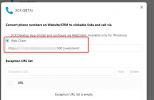
Seeing that you are using Chromebooks, you would need to configure the extension to load the numbers into the WebClient:
1634626676126.png
 
  • Like
Reactions: Evolute IT
Hi all
is it possible, as it was with chrome ext, to have different 3cx account at the same time (with chrome it was possible with different profils)
i can't reproduce with windows app

Thanks
 
Hi all
is it possible, as it was with chrome ext, to have different 3cx account at the same time (with chrome it was possible with different profils)
i can't reproduce with windows app

Thanks
No, you can only have 1 User Account registered at a time.
Technically you could have 1 account on your Desktop App, 1 in your WebClient and 1 in the 'old' Windows App, but that is not the intended behavior we suggest.
 
Status
Not open for further replies.

Forum statistics

Threads
112,025
Messages
590,368
Members
164,978
Latest member
FringeIT-Eric