- Joined
- Jan 7, 2021
- Messages
- 14
- Reaction score
- 0
Just wondering if there is a workaround to this...
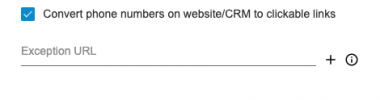
When using the web client I can't get "tel:" links in a browser to get sent to the web client chrome extension. The only way I can have it work is to turn on the Chrome extension options, "Convert phone numbers on website/CRM to clickable links" to pass them to the dialer pad of the Chrome extension dialer. I am fine with this, but its annoying and a problem to me because I don't want it to try and do that to any 10 digit number it see's on a page. I only want it on our custom made web based CRM page.
I see there is an exception URL list but that is backwards to me. I would rather have a whitelist or even better, instead of trying to "smartly" interpret numbers it see's, why can't it just look for already "linked" tel: numbers and take those as numbers that can be passed. Does that make sense?
-change the option to either whitelist or blacklist urls
OR
-just have the "convert phone numbers" option not try to interpret any 10 digit number but just look for TEL links on a page and handle those
When using the web client I can't get "tel:" links in a browser to get sent to the web client chrome extension. The only way I can have it work is to turn on the Chrome extension options, "Convert phone numbers on website/CRM to clickable links" to pass them to the dialer pad of the Chrome extension dialer. I am fine with this, but its annoying and a problem to me because I don't want it to try and do that to any 10 digit number it see's on a page. I only want it on our custom made web based CRM page.
I see there is an exception URL list but that is backwards to me. I would rather have a whitelist or even better, instead of trying to "smartly" interpret numbers it see's, why can't it just look for already "linked" tel: numbers and take those as numbers that can be passed. Does that make sense?
-change the option to either whitelist or blacklist urls
OR
-just have the "convert phone numbers" option not try to interpret any 10 digit number but just look for TEL links on a page and handle those