


- Joined
- Mar 27, 2019
- Messages
- 50
- Reaction score
- 7
Hello,
We are still on V16 with most our customers due to the changes in the web interface which have made it quite a bit less pleasant to use. It is our hope that this will be improved in future releases.
Whilst changes in the User interface can be unpleasant, lacking functionality and complicated workflows to do basic processes is something that our customers are not willing to accept. Therefore, one of the problems which I would like to solve asap is the functionality of click to call from a web browser. The web browser most of our customers use is Google Chrome.
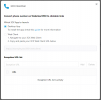
It seems the 3CX Click2Call Chrome extension is still necessary in order to have click to call functionality. I have it installed and configured as seen in the screenshot below.
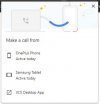
The problem which we are having is that ever since the update to 3CX v18, Chrome has started opening the following popup whenever a tel link is clicked. I want to be able to set a default device which is used whenever a tel link is clicked. This dialogue also appears if there is only one option.
The default app to be used for a tel link or a callto link are set to the new 3CX app in windows. This message seems to be Chromes doing.
I have found the following solution to the problem. This didn't work for me though. None of the options stated in the solution were visible on any of the devices I checked.
https://support.google.com/chrome/t...-a-call-from-popup-when-clicking-on-tel?hl=en
I apreciate any help.
Kind regards,
David Schumann
We are still on V16 with most our customers due to the changes in the web interface which have made it quite a bit less pleasant to use. It is our hope that this will be improved in future releases.
Whilst changes in the User interface can be unpleasant, lacking functionality and complicated workflows to do basic processes is something that our customers are not willing to accept. Therefore, one of the problems which I would like to solve asap is the functionality of click to call from a web browser. The web browser most of our customers use is Google Chrome.
It seems the 3CX Click2Call Chrome extension is still necessary in order to have click to call functionality. I have it installed and configured as seen in the screenshot below.
The problem which we are having is that ever since the update to 3CX v18, Chrome has started opening the following popup whenever a tel link is clicked. I want to be able to set a default device which is used whenever a tel link is clicked. This dialogue also appears if there is only one option.
The default app to be used for a tel link or a callto link are set to the new 3CX app in windows. This message seems to be Chromes doing.
I have found the following solution to the problem. This didn't work for me though. None of the options stated in the solution were visible on any of the devices I checked.
https://support.google.com/chrome/t...-a-call-from-popup-when-clicking-on-tel?hl=en
I apreciate any help.
Kind regards,
David Schumann


