Solved Click to meet

Status
Not open for further replies.

pauly

Free User
Joined
Apr 8, 2020
Messages
17
Reaction score
5
I have set up click to meet and started a meeting from the web client.
However, I have the following problem:
When a user clicks the link to the meeting they get put in a new meeting (with only them in it) different to the one i am waiting in.

What am i doing wrong?

Thanks in advance...
 
I have set up click to meet and started a meeting from the web client.
However, I have the following problem:
When a user clicks the link to the meeting they get put in a new meeting (with only them in it) different to the one i am waiting in.

What am i doing wrong?

Thanks in advance...
Using the wrong link to get them in the current one.

Click2Meet creates a new meeting. That's expected.

Use the participant link (or "Add Participant" feature) to send the current meeting's link to people.
 
Thanks.

So how does click to meet work?
Should it give me a notification when someone clicked it?
At the moment they just disappear into their own private meeting and I don't get any notification...
 
you get a chat message, which you can see in your webclient or mobile device
 
Yea, i was expecting a notification or chat

However I don't get any chat or notification.
Everyone who clicks the link gets put in their own private meeting.
 
Hi Pauly,

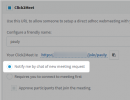
Change your Click2Meet settings like so:

1614593425754.png

And then check your Webclient (log in with same extension) for messages

You should receive this message as soon as a guest enters the meeting and sits in the room

1614593553963.png
 
Thanks,

I already had it setup like that, which is why I was a bit confused.
Anyway, I restarted all the services in the dashboard and now it works as expected.
I should have tried that first...
 
  • Like
Reactions: ChrisC_3CX
Status
Not open for further replies.

Forum statistics

Threads
111,973
Messages
590,078
Members
164,896
Latest member
sameage