- Joined
- Aug 24, 2007
- Messages
- 64
- Reaction score
- 4
Version 20.0 Update 2 (Build 715 Release).
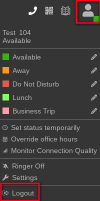
When a user closes their web browser while using the WebClient and doesn't use the WebClient Logout function from the WebClient account menu, this leaves their extension status as online (e.g. as Available), when they are not.
Is there an admin setting required to be enabled to detect this type of disconnection and force the extension back to "unregistered" status? Haven't seen anything obvious relating to this in my hunting around the admin pages...
When a user closes their web browser while using the WebClient and doesn't use the WebClient Logout function from the WebClient account menu, this leaves their extension status as online (e.g. as Available), when they are not.
Is there an admin setting required to be enabled to detect this type of disconnection and force the extension back to "unregistered" status? Haven't seen anything obvious relating to this in my hunting around the admin pages...