


- Joined
- Sep 10, 2021
- Messages
- 18
- Reaction score
- 5
The PBX (v18, update 1 = lastest) is localy hosted on a Raspberry Pi, with dynamic IP.
1/ The PBX works normal, the dynamic IP (IPv4) works normal and correct.

2/ Firewall check is normal:
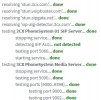
3/ I tested the STUN servers from command line:
pi@raspberrypi:~ $ stun stun.3cx.com
STUN client version 0.97
Primary: Independent Mapping, Port Dependent Filter, preserves ports, no hairpin
Return value is 0x000017
pi@raspberrypi:~ $ stun stun.voipbuster.com
STUN client version 0.97
Primary: Independent Mapping, Port Dependent Filter, preserves ports, no hairpin
Return value is 0x000017
pi@raspberrypi:~ $ stun stun.sipgate.net
STUN client version 0.97
Primary: Independent Mapping, Port Dependent Filter, preserves ports, no hairpin
Return value is 0x000017
4/ But the log continues to give the same error:
14/11/2021 23:08:29 - [EC100009]: External application [raspberrypi:0/PbxConfigTool] is disconnected:
14/11/2021 23:06:52 - [CM306002]: There is no valid STUN server specified! External IP can not be resolved.
14/11/2021 22:33:32 - [CM306002]: There is no valid STUN server specified! External IP can not be resolved.
14/11/2021 22:00:11 - [CM306002]: There is no valid STUN server specified! External IP can not be resolved.
14/11/2021 21:26:51 - [CM306002]: There is no valid STUN server specified! External IP can not be resolved.
14/11/2021 20:53:31 - [CM306002]: There is no valid STUN server specified! External IP can not be resolved.
14/11/2021 20:20:11 - [CM306002]: There is no valid STUN server specified! External IP can not be resolved.
14/11/2021 20:00:14 - [CM506004]: STUN request to STUN server 77.72.169.210:3478 has timed out; used Transport: 0.0.0.0:5060/UDP fk=0 tgt=
14/11/2021 19:46:51 - [CM306002]: There is no valid STUN server specified! External IP can not be resolved.
14/11/2021 19:13:31 - [CM306002]: There is no valid STUN server specified! External IP can not be resolved.
14/11/2021 18:40:11 - [CM306002]: There is no valid STUN server specified! External IP can not be resolved.
14/11/2021 18:06:51 - [CM306002]: There is no valid STUN server specified! External IP can not be resolved.
14/11/2021 17:33:30 - [CM306002]: There is no valid STUN server specified! External IP can not be resolved.
14/11/2021 17:08:24 - [EC100009]: External application [raspberrypi:0/PbxConfigTool] is disconnected:
14/11/2021 17:00:10 - [CM306002]: There is no valid STUN server specified! External IP can not be resolved.
I think it's a bug, and I think this is not the first time that it's mentioned (Google Search), but it has never been resolved.
1/ The PBX works normal, the dynamic IP (IPv4) works normal and correct.
2/ Firewall check is normal:
3/ I tested the STUN servers from command line:
pi@raspberrypi:~ $ stun stun.3cx.com
STUN client version 0.97
Primary: Independent Mapping, Port Dependent Filter, preserves ports, no hairpin
Return value is 0x000017
pi@raspberrypi:~ $ stun stun.voipbuster.com
STUN client version 0.97
Primary: Independent Mapping, Port Dependent Filter, preserves ports, no hairpin
Return value is 0x000017
pi@raspberrypi:~ $ stun stun.sipgate.net
STUN client version 0.97
Primary: Independent Mapping, Port Dependent Filter, preserves ports, no hairpin
Return value is 0x000017
4/ But the log continues to give the same error:
14/11/2021 23:08:29 - [EC100009]: External application [raspberrypi:0/PbxConfigTool] is disconnected:
14/11/2021 23:06:52 - [CM306002]: There is no valid STUN server specified! External IP can not be resolved.
14/11/2021 22:33:32 - [CM306002]: There is no valid STUN server specified! External IP can not be resolved.
14/11/2021 22:00:11 - [CM306002]: There is no valid STUN server specified! External IP can not be resolved.
14/11/2021 21:26:51 - [CM306002]: There is no valid STUN server specified! External IP can not be resolved.
14/11/2021 20:53:31 - [CM306002]: There is no valid STUN server specified! External IP can not be resolved.
14/11/2021 20:20:11 - [CM306002]: There is no valid STUN server specified! External IP can not be resolved.
14/11/2021 20:00:14 - [CM506004]: STUN request to STUN server 77.72.169.210:3478 has timed out; used Transport: 0.0.0.0:5060/UDP fk=0 tgt=
14/11/2021 19:46:51 - [CM306002]: There is no valid STUN server specified! External IP can not be resolved.
14/11/2021 19:13:31 - [CM306002]: There is no valid STUN server specified! External IP can not be resolved.
14/11/2021 18:40:11 - [CM306002]: There is no valid STUN server specified! External IP can not be resolved.
14/11/2021 18:06:51 - [CM306002]: There is no valid STUN server specified! External IP can not be resolved.
14/11/2021 17:33:30 - [CM306002]: There is no valid STUN server specified! External IP can not be resolved.
14/11/2021 17:08:24 - [EC100009]: External application [raspberrypi:0/PbxConfigTool] is disconnected:
14/11/2021 17:00:10 - [CM306002]: There is no valid STUN server specified! External IP can not be resolved.
I think it's a bug, and I think this is not the first time that it's mentioned (Google Search), but it has never been resolved.

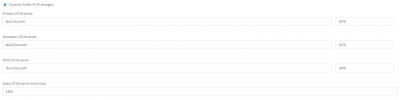
 . It's just that the 3CX stun servers are now within the CDN so stun.3cx.com will resolve to multiple IPs at once whereas stun2.3cx.com and stun3.3cx.com will each resolve to a single ip that's already resolved by stun.3cx.com hence the message you're seeing. I'm afraid you cannot leave the fields empty so I'd recommend leaving them as is.


