Column Title Meanings on CSV Export of Call Logs

Status
Not open for further replies.

Reece Cawthorn

Platinum Partner
Advanced Certified
Joined
Mar 5, 2021
Messages
58
Reaction score
15
Hi,

I recently exported the call logs from one of our on-premises Windows 3CX Instances (V.18).

When analysing the CSV Export, it became apparent that there were a number of column headings and values which were not clear (see below):

1647875817973.png

Are there any sources available which explain what each of these columns represent (i.e. calltype, endstatus, endstatushint, etc.)?

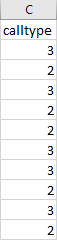
Furthermore, a number of these columns use numerical codes to indicate values (see below); similarly, are there any sources which would serve to explain what these represent?
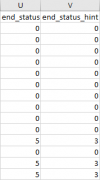

1647876009881.png1647876046561.png

Any help with this would be greatly appreciated!

All the best,

Reece
 

Attachments

  • 1647875978176.png
    1647875978176.png
    1.2 KB · Views: 3
This is not an exported call log per se but rather one of the database tables used for call logging. It may exist in a 3CX backup as a csv file but it only exists there for the 3CX Restore process and is not meant to be interpreted by itself or parsed by any other software.
 
Hi Chris,

Thank you for getting back to me on this!

For context, this is currently being explored as the call logs were lost on the current system following the upgrade from v.16 to v.18 (in mid-February).

All call details prior to the upgrade were lost and, as a result, the automated reports did not incorporate these into the monthly reports (which are used to charge sub-divisions of the company accordingly).

As such, how would one go about restoring a backup of a system which contains the FQDN records but does not take over the FQDN when generated (i.e. an 'Offline' system which could be used to store the lost call logs and generate subsequent reports without inadvertently 'stealing' the FQDN)?
 
You could do a restore to a second system and once it's up and running, on your original PBX do a license refresh then pull the network of the 2nd.
 
Hi Kieferschild,

Thank you for getting back in touch regarding this.

Unfortunately, this on-prem system is for a hospital so this solution would not be possible.

how would one go about restoring a backup of a system which contains the FQDN records but does not take over the FQDN when generated (i.e. an 'Offline' system which could be used to store the lost call logs and generate subsequent reports without inadvertently 'stealing' the FQDN)?

Are there any other suggestions you could make to facilitate the above?
 
@ReecelPEX

I'll PM you shortly regarding this.
 
Status
Not open for further replies.

Forum statistics

Threads
111,974
Messages
590,083
Members
164,900
Latest member
Silent_Guru