Combined Webmeeting with Dial in problems

Status
Not open for further replies.

robertg007

Customer
Joined
May 25, 2019
Messages
6
Reaction score
1
I am new to 3cx and am trying to get the webmeetings and the PBX combined in one conference call. I can hold an audio conference call successfully with multiple participants, and I can hold a web meeting with multiple participants. However when I try to call in to a webmeeting the phone remains on the hold music and the web meeting interface updates with the participant on the phone added to the participants list, and the browser starts to read out the "you are joining the conference with the following participants... press star to continue" which I can't find a way of doing in google chrome as there isn't a phone number keyboard that I can see.

I hope this is a simple issue, but I just can't figure it out.
 
Hi Robert

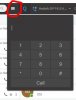
What dialler are you using in Chrome? Is it the 3CX Webclient, here's where you will find the dialler if it is.

10795
 
Thank you Brent.

The dial in to webmeeting is now working. I’m not 100% sure of what fixed it but I came back to test webmeeting with your suggestion and it just worked when previously it remained on hold.
The previous day I port forwarded through the firewall port 443, but testing after this left the same problem. But today it works.
I will update this post if I learn of the exact issue.
Thank you for your help.
 
The problem has re occurred where the dial in is asked for their name, which when it previously worked the caller was just passed in to the meeting. Each user is placed on the hold music with the press # to cancel and * to enter message.
I have not changed any settings on the network or firewall.
I was hoping to use 3cx as my main meeting tool but this problem is causing me to loose trust in it.
 
  • Like
Reactions: Brent Topine
Hello @robertg007

From what you are describing it sounds like your audio and Https ports are not forwarded correctly.
When you create a webmeeting the meeting is hosted in our webmeeting servers. Audio conferences are hosted on the PBX. When the 2 combine, the PBX uses the Webmeeting bridge to connect the 2. If they are not connected and the dial in callers listen to music on hold(or only to each other) that means that the PBX does not have 2 way communication with the webmeeting server. Ensure that the https port of the PBX is forwarded correctly and the webmeeting servers can be contacted on port 443.
 
Yiannish, thank you for the response.
I have followed the 3cx guide at the for firewall and the Draytek firewall and the firewall test is passing 100%. Is there an other guide for how to set this up as I have 443, 5001 both port forwarding to the 3cx pbx, but what I read from you is that the 443 should be routed to the web meeting server instead but I see no way of doing this in the Draytek router.
Any help much appreciated.
 
As this issue seems to be related to the bridge on 443 between the meeting server and the PBX is there a way of actually testing the bridge?
in The attached image you can see a connection called web meeting which I assume is the bridge, however this never connects.
I assume that this is the problem but I cannot work out how to solve this still. All ports are open and a gold partner has reviewed my set-up and confirmed that all ports are correctly set on my firewall and port forwarding.
10878
 
Following the above issues I believe I have found the main issue. I was setting up the meetings from the 3CX desktop client for MAC, and these meetings failed to link, but when organising meetings from the web client they all worked.
I tested the issue on a Debian install and a raspberry pi with the same results.
 
Status
Not open for further replies.

Latest Posts

Forum statistics

Threads
111,973
Messages
590,075
Members
164,895
Latest member
jasonkkrause