- Joined
- Oct 25, 2019
- Messages
- 3
- Reaction score
- 0
Hi,
I have recently installed the 3CX Live Chat & Talk plugin on the website of one of my client: https://soutien-scolaire.fr/
The configuration was working after some struggle setting up the Click2Talk URL in the plugin settings / 3cx account settings.
After several days of operation, users reported that the icon was available but disabled (no action on click).
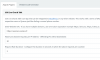
So, we checked the configuration (OS and browser/version), the plugin is creating an error on Windows 7 and Internet explorer, Windows 10 and Edge (older versions) with callus.js:

Could you please help?
I can share website credentials (official support) for further configuration if needed.
We don't want the phone service, just the talk module, and it is disabled.
It would be really nice to get the browser compatibility somewhere, do you have any compatibility table?
Also, if the 3CX Live Chat & Talk is not working correctly on old browser versions and OS, is there any alternative, for example to connect WP-Live Chat by 3CX to the 3CX client account?
Thank you.
Alex
I have recently installed the 3CX Live Chat & Talk plugin on the website of one of my client: https://soutien-scolaire.fr/
The configuration was working after some struggle setting up the Click2Talk URL in the plugin settings / 3cx account settings.
After several days of operation, users reported that the icon was available but disabled (no action on click).
So, we checked the configuration (OS and browser/version), the plugin is creating an error on Windows 7 and Internet explorer, Windows 10 and Edge (older versions) with callus.js:
Could you please help?
I can share website credentials (official support) for further configuration if needed.
We don't want the phone service, just the talk module, and it is disabled.
It would be really nice to get the browser compatibility somewhere, do you have any compatibility table?
Also, if the 3CX Live Chat & Talk is not working correctly on old browser versions and OS, is there any alternative, for example to connect WP-Live Chat by 3CX to the 3CX client account?
Thank you.
Alex