Solved Conference Callin via Phone does not work. People keep hearing the onHold-music

Status
Not open for further replies.

teenet_au

Bronze Partner
Advanced Certified
Joined
Feb 26, 2021
Messages
40
Reaction score
8
Hi,

I am having exact same issue referred in this closed thread https://www.3cx.com/community/threa...k-people-keep-hearing-the-onhold-music.81950/

My setup is pretty similar:
3CX Version: 16.0.8.9
Server OS: Debian 9
Is the 3CX Server Hosted and where?: No, on-premise
IP Phone Make/Model/Firmware: n/a
Provisioning Method: Local / VPN / STUN / SBC: n/a
Trunk Provider or Gateway Make/Model: BreezeConnect
Has the Firewall Checker passed: YES
Are custom Phone Templates being used: NO


In my case I have confirmed that In WebMeeting bridge SIP trunk the Advanced tab, that all "Allow inbound calls", "Allow outbound calls" and "Supports Re-Invite" options are checked.

Firewall check has passed.

There are no error or warning messages logged in Events or Activity logs.

Any Ideas what to check next?
 
Hi @teenet_au

This usually happens when the PBX cannot communicate with the 3CX MCUs either because your audio ports are not forwarded properly or because your https port is not port and the PBX is not accessible from the outside.

Run the firewall checker again and make sure that all ports mentioned here are open including your https port.
 
I have just run the firewall checker again and all tests pass and have green tick in dashboard.

I can confirm port 5001 is forwarded correctly as I can connect to web interface and web client remotely using port 5001. Also 3CX app on smartphones are working so tunnel 5090 is OK as well.

Any other suggestions what could cause this. I don't think its a router issue.
 
@teenet_au
The ports used by the 3CX Webmeeting bridge are UDP range 10500-10999. The firewall checker will test most ports but will skip port range 10500-10600. That said, I'd recommend checking that this range specifically has indeed been forwarded regardless of whether the firewall checker passes just to be safe.

You can test if the issue is related to the traffic between the 3CX PBX and the Webmeeting MCU server by having two or more dial-in users join the conference. If what happens is that the dial in users can only hear each other, then this further confirms it.
 
@ChrisC_3CX

Hi, I can confirm that entire range UDP Ports 9000-10999 are forwarded to the 3CX server. When second dial in user connects the first dial in user come off hold and the two dial in users can hear each other, just not the web based users. If organiser ends the meeting from web both dial in lines hangup.

Should there be a an outgoing "call" from our system the the MCU? I read somewhere that dial in users to WebMeetings use up 1SC licence for the required call to the MCU to join in. I am not seeing any outgoing call in the dashboard or call log. When is this call established and should it show up anywhere in the management console.

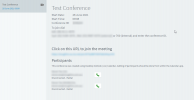
In the organisers webclient only dial in participants are showing, not the organiser or web participants is this normal?

Cap1.png

Is there any documentation available anywhere that explains the traffic flow of WebMeetings with dial in users involved? If I know what to expect and when I can try a packet capture to see whats going wrong.
 
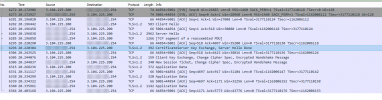
Did a quick packet capture anyway although not 100% sure what I am looking for but did notice some traffic between our PBX and the MCU (3.104.225.200) this seems to be initiated by the MCU and come in to port 5001. I do not see any UDP or other traffic coming from/to the MCU at all.


Cap1.png
 
@teenet_au

When second dial in user connects the first dial in user come off hold and the two dial in users can hear each other, just not the web based users.
This suggests that the issue is between the 3CX PBX and the MCU.

Should there be a an outgoing "call" from our system the the MCU?
When dial participants join the webmeeting, a connection between the 3CX PBX and the MCU is established yes.

read somewhere that dial in users to WebMeetings use up 1SC licence for the required call to the MCU to join in. I am not seeing any outgoing call in the dashboard or call log. When is this call established and should it show up anywhere in the management console.
Actually, every dial in user consumes 1 SC each, but an SC is not consumed for the connection between the 3CX PBX and the MCU and it will not show up in the Management Console either.


I do not see any UDP or other traffic coming from/to the MCU at all.
Is there any chance you are restricting outbound traffic?

Media traffic from the 3CX PBX to the 3CX MCUs is as follows:

3CX PBX Port range: 10500 - 10999 UDP
to and from
3CX MCU Port Range: 48000-65535 UDP

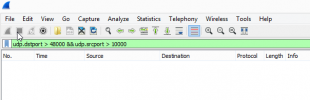
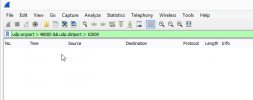
Do you see any traffic here whatsoever? I'd recommend only filtering with the port range first. You could then maybe add the PBX's IP to narrow it down if you do detect traffic.
 
@ChrisC_3CX

If I filter based on above I get nothing

Cap1.png

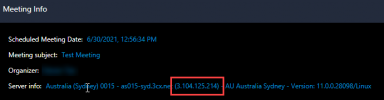
Should these UDP packets be going to/from the host specified in WebMeeting (e.g. as below) or a different host.

Cap2.png

Only traffic I can see to this IP is the SSL TCP traffic similar to my previous screen image.
 
BTW if I reverse the filter I also still get nothing

Cap1.png
 
Could you please check the following:

• Access the Management Console
• Go into Settings >> General
• Check if the "Enable WebRTC softphone in Web Client..." option is enabled. If not, enable it, click on OK and try again.
 
@ChrisC_3CX

Thankyou so much :), that was it. think I unticked it at some stage, just saw mention of softphone for web client and browser extension (which we don't use and prefer staff not to be able to use) and didn't notice the mention of Dial-In integrations in the brackets.

I assume then there is no way to disable softphone in the web client and still have dial-in conferences. This is mainly to protect those click happy users from selecting softphone in the browser and then logging a ticket complaining about their handset is not dialing.

I sort of assumed that the dial-in intergration "call" was coming from the PBX and not the web client hosting the meeting but I guess the keywords here are "associated features" :)
 
You're very welcome!

Glad to see this got resolved! Please do not hesitate to start a new thread should you need anything else!
 
Status
Not open for further replies.

Forum statistics

Threads
111,832
Messages
589,284
Members
164,662
Latest member
DejanMDS