Solved Conference Extension / DID stopped working

Status
Not open for further replies.

sandym

SMB User
Joined
Aug 29, 2021
Messages
11
Reaction score
0
I have had Conference Call extension 70 setup with a DID for 2 years. All of a sudden, when calling the phone number, callers get the main IVR instead of going to the conference extension. I can input 70 from the main IVR to go to the conference line, but need the DID to work again.

Also, I have a DID assigned to a user. That number also lands at the main IVR instead of going directly to the user's extension.

These have both previously worked and recently stopped.

I upgraded to V20 hoping that might fix, but still not working.

Any suggestions are appreciated.
 
Hi there.
It can be the case that the format of the DID you enter the 3CX and DID that provider send you in the invite is not matching.
Are you using 3CX supported trunk there?
 
I believe the DID format is correct. I use 3CX hosting. It has been working fine for a couple of years, then just stopped working properly. Very odd. I tried removing the DID and re-adding it but that did nothing.
 
At firtst verify if the number that the provider sends you is the same as you entered in the system.
 
Yes, the same (e164 format). All numbers are working properly - except the one assigned to conference, and the one assigned to an individual user. Those two also go directly to the main IVR just like the other numbers.

I don't understand what could have happened to cause what has been working fine - to just stop working. I'm the only person with access to make changes and I haven't changed anyting.
 
So if you call that conference directly from an internal user, does it work fine?
 
Yes, works fine internally.
 
It seems to be a routing issue on the System. Check what number format provider places in TO SIP field, is it the same as DID you have for the conference?
 
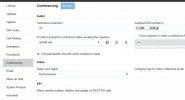
Is there a screenshot that I can show you that would be helpful? I appreciate your help so much. I have checked the numbers over and over.
 

Attachments

  • image 06-24-24 at 11.07 AM.JPG
    image 06-24-24 at 11.07 AM.JPG
    82.6 KB · Views: 18
So in your case the number is entered with +1XXX is your provider sending you the number in the same format?
 
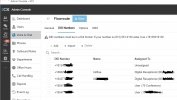
Does this indicate that Flowroute is sending the number in the same format?
 

Attachments

  • image 06-25-24 at 12.17 PM.JPG
    image 06-25-24 at 12.17 PM.JPG
    81.5 KB · Views: 17
This screenshot shows how you enter the numbers in your system, but not how the provider send them and the format of the number.
 
I have reached out to Flowroute to find out as I don't know how to tell.
 
3CX logs could show you that. See what provider will advise
 
In the event log, I see some warnings with an ID of 30051
 
Problem solved. I placed an asterisk * instead of a + in front of the DIDs.
 
Glad to know the issue is resolved ;)
 
Status
Not open for further replies.

Latest Posts

Forum statistics

Threads
111,831
Messages
589,276
Members
164,660
Latest member
RJenkinsROCK