Config File URL not working?

KL HG

Silver Partner
Joined
Nov 13, 2025
Messages
3
Reaction score
1
Trying to set up a PBX. We get past the OS install and onto the 3CX Config Tool where it asks to use a web browser or cli. When we chose web browser and go to the IP address the link takes us to 3cx.com/install then redirects to 3cx.com/try. We try signing into our account on /try and it will load for a seconds then refresh the page without logging in. I tried 2 different browsers and the only way I was able to stay logged in was by using Incognito mode, but even then, going to 3cx.com/install redirects us to /try.

Anyone have similar issues or have any advice?
 
Hello,

Can you let us know what install steps you are doing before that question? Logging into portal, clicking on what? Exact full steps please.
 
Hello,

Can you let us know what install steps you are doing before that question? Logging into portal, clicking on what? Exact full steps please.
Hi,

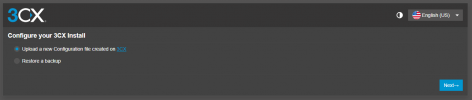
I have the system loaded with the 3CX System (from https://portal.3cx.com/partner/downloads) and get to the point of the install where it asks us to upload the config file. When we log into the IP Address of the new PBX system to upload the config and click the link that directs to "3cx.com/install", it redirects to "3cx.com/try".

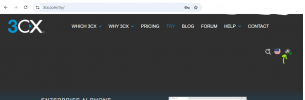
This is where I'm hitting the roadblock - the landing page of the IP Address. The hyperlinked "3CX" is supposed to direct to "https://www.3cx.com/install/" but instead brings me to "https://www.3cx.com/try/" and won't let me log in. When I try to click the profile logo in the top right of the page where it says "login", it thinks for a moment then reloads "3cx.com/try" and doesn't allow me to log in.

1763402138164.png
 
Hi,

It probably simpler if you just go to the portal, preset things and then do the install -

Go to the portal, choose add a system/trial from the top, choose On Premise I would expect given you are self installing, choose your FQDN, digit length, localization, then as soon as you choose install type (Linux/Windows) as well as a link to the latest installer you also get the links to download the config file.

I will also check the exact flow there - but do note that if you are logged in, on the Try page you can click your account icon on the top right and go to the portal/systems etc pages. (Depending on resolution that icon could be inside a hamburger menu)
1763449245256.png
 
Sorry just now seeing this. The problem was that the link directs you to the incorrect web page. it sends you to 3cx.com/install instead of install.3cx.com. I verified we had the latest 3cx system downloaded.

We got it resolved. Thank you.
 
  • Like
Reactions: KyriacosS_3CX
Thanks for the additional detail.
 
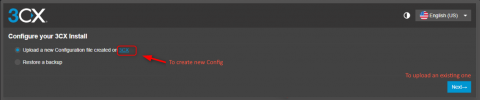
Following up - that is the correct behaviour if the link on that bullet point is clicked, so that a new Config file can be created in case someone starts with the installer before going to the portal. If "Next" is selected, which is the main flow, the existing config can be uploaded.

1763969383719.png
 
  • Like
Reactions: RoryJ

Forum statistics

Threads
111,954
Messages
589,921
Members
164,851
Latest member
DrunkeMeister