- Joined
- Dec 31, 2024
- Messages
- 2
- Reaction score
- 0
Hello,
I have been trying to configure my new base yealink W70B through online 3CX, following https://www.3cx.com/sip-phones/yealink-dect-phones/ and https://www.3cx.com/docs/manual/ip-phones/ .
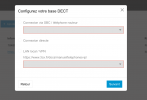
I encounter issues at the second step, where nothing appears after I enter the MAC adress - see screenshot. I cannot click anything, nor 'next".
I have tried refreshing page, closing and reopening.
I have checked the version of my base and it is the right one.
Everything about the base seems connected, I just cannot work it on 3CX.
Can someone help ?
Thanks in advance.
I have been trying to configure my new base yealink W70B through online 3CX, following https://www.3cx.com/sip-phones/yealink-dect-phones/ and https://www.3cx.com/docs/manual/ip-phones/ .
I encounter issues at the second step, where nothing appears after I enter the MAC adress - see screenshot. I cannot click anything, nor 'next".
I have tried refreshing page, closing and reopening.
I have checked the version of my base and it is the right one.
Everything about the base seems connected, I just cannot work it on 3CX.
Can someone help ?
Thanks in advance.