Congratulations for new design for Snom D785

Status
Not open for further replies.

AWS2P

Silver Partner
Basic Certified
Joined
Jan 9, 2014
Messages
5,076
Reaction score
1,096
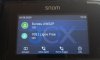
Since latest update .641 applyied for me last night , have got nice surprise to see my D785 turn into new dark blue design when automatic provisioning, really nice.
3CX logo fully integrated in background is better than it was previously on bottom right corner.

Congratulations to all who create this.
This is well done.
 
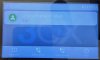
It's really hard to read - pretty, yes - but the low contrast of white text on light grey background is very poor. Would definitely fail W3CAG accessibility guidelines!
IMG_20200828_132438.jpg
 
on mine D785, contrast is really good, no problem at all , when idle phone goes darker but always ok to see details, and since you use it light increase so it's perfect for me.

Previous white was for me like your actual screen copy very pale colors and 3cx logo was covering part of infos as it was in first plan.
IMG_20200828_152512 (Copier).jpg
 
Last edited:
Hmmm. Something is amiss then... This is the latest Firmware (10.1.54.16) and 3cx (16.0.6.641) and the screen menus are almost invisible - even when the phone is active...

Have found a new menu 'Themes' buried under the Settings->Prefs->Display->Primary->Themes and now having selected one of those the contrast has improved - even selecting the 'Dark' theme (apparently the new default in the template :-( ) has improved it, firmware upgrade obviously doesn't set colours properly...

Would have thought new firmware and reprovision would have provisioned the theme properly rather than left the various choices random... Will have to weather the storms of discontent from users for a while - until they've all changed their themes - I suppose.
 
That's nice! Is the logo in the background customizable?
 
@prolateral Once the firmware is upgraded and you are on SP6, make sure you hit re-reprovision once for all the Snom phones and the color scheme will be corrected and should appear like the one @aws2p showed.
 
  • Like
Reactions: JohnS_3CX
I recall submitting feedback a year or so ago about same. I love the Snom hardware, but their screens/interface generally pale in comparison to Yealink, and one of the feedback notes I gave to 3CX was the dark background with white text on Yealinks is generally more appealing than the opposite on Snoms. Nice to know it was implemented; looks nice.
 
Well....isn't this just a massive PITA. I even have the Theme set to Light in the provisioning file and it still loads the dark scheme. 16.0.641 Enterprise with custom backgrounds. Anyone have a thought on how to make it stick?
 
Since the built in Light Theme does not work well with a white BG. Here are the settings that need changed in the phone template.

titlebar_text_color=51 51 51 255
text_color=51 51 51 255
subtext_color=51 51 51 255
extratext_color=123 124 126 255
extratext2_color=123 124 126 255
fkey_label_color=123 124 126 255
fkey_pressed_label_color=242 242 242 255
selected_line_text_color=61 133 198 255
 
Status
Not open for further replies.

Latest Posts

Forum statistics

Threads
111,962
Messages
589,986
Members
164,867
Latest member
swegner