


- Joined
- Jan 29, 2019
- Messages
- 37
- Reaction score
- 2
Hello,
first my old thread wich was closed: https://www.3cx.com/community/threa...v18-webmeeting-change-port-5001-to-443.86477/
I made a full backup, uninstalled 3CX on Windows Server 2016, reinstalled with the newest Exe file (then there was an error that my backup is newer as the installation)
There is no new v18 version to download available and in my license portal I don't even have a v18 Download for Windows.. only v16.
So I did basic configuration, updatet the instance and then did a recover.
Then I created a temporary port redirect on windows from 5001 to 443 and 5000 to 80. Provisioned all Sip Phones which have now the correkt http provision link.
A day before I already allowed port 80 and 443 in the firewall rules and set up the dnat rules to the 3cx Server.
Everything is working as expected.. first.
In testing we had issues with the meeting app on iOS and Android, it will stuck on "Authenticating". Then I also found out that Firefox is unable to connect, while Edge and Chrome work fine.
There are websocket errors like this in the dev console after trying to connect:
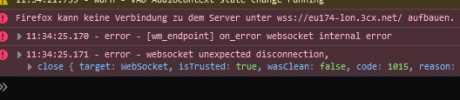
Now this is a London UK location .. which is fully allowed by our sophos configuration.
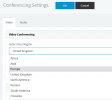
Now the funny thing, I go to Conferencing Settings in the 3CX Administartion and switch the Region from Europe to United Kingdom.. THEN it works on the App and on Firefox..
I tried to switch back to Europe.. the error happens again..
Do you have a clue why its not working on Europe Region after switching from https://... :5001 to https: 443 ??
And why is there still a connection to your servers as I host the webmeeting now since v18?
Is it possible that some old configuration or things I can not know are still wrong configured (on port 5001) ? I dont know exactly how the webservers work.. Fun fact #2, when I uninstalled 3CX Server my collegues where still in a working webmeeting, until I installed the new instance, then it shut down.
What is happening in the webmeeting .. ?
first my old thread wich was closed: https://www.3cx.com/community/threa...v18-webmeeting-change-port-5001-to-443.86477/
I made a full backup, uninstalled 3CX on Windows Server 2016, reinstalled with the newest Exe file (then there was an error that my backup is newer as the installation)
There is no new v18 version to download available and in my license portal I don't even have a v18 Download for Windows.. only v16.
So I did basic configuration, updatet the instance and then did a recover.
Then I created a temporary port redirect on windows from 5001 to 443 and 5000 to 80. Provisioned all Sip Phones which have now the correkt http provision link.
A day before I already allowed port 80 and 443 in the firewall rules and set up the dnat rules to the 3cx Server.
Everything is working as expected.. first.
In testing we had issues with the meeting app on iOS and Android, it will stuck on "Authenticating". Then I also found out that Firefox is unable to connect, while Edge and Chrome work fine.
There are websocket errors like this in the dev console after trying to connect:
Now this is a London UK location .. which is fully allowed by our sophos configuration.
Now the funny thing, I go to Conferencing Settings in the 3CX Administartion and switch the Region from Europe to United Kingdom.. THEN it works on the App and on Firefox..
I tried to switch back to Europe.. the error happens again..
Do you have a clue why its not working on Europe Region after switching from https://... :5001 to https: 443 ??
And why is there still a connection to your servers as I host the webmeeting now since v18?
Is it possible that some old configuration or things I can not know are still wrong configured (on port 5001) ? I dont know exactly how the webservers work.. Fun fact #2, when I uninstalled 3CX Server my collegues where still in a working webmeeting, until I installed the new instance, then it shut down.
What is happening in the webmeeting .. ?


 The computer gods have spoken!


