ConnectWise Invent call journalling not working v18

Status
Not open for further replies.

JSmith

Titanium Partner
Joined
Jul 18, 2019
Messages
1
Reaction score
0
We have a long standing client who is using ConnectWise CRM integration. This has been working seamlessly up until the upgrade to v18, which has broken the call journalling aspect. The CRM being used is ConnectWise Invent. 3cx support has stated that it's only ConnectWise Managed that is supported.

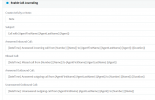
We've had some success in altering the variables used (see attached) whilst using the new v18 template under the CRM settings. However, this seems to be intermittent. An activity isn't created for every call. Had anyone else run into the same issues?
 

Attachments

  • Connectwise_variables.png
    Connectwise_variables.png
    48.4 KB · Views: 11
Hello @JSmith,

The integration has been tested with ConnectWise Manage, but if you had this working with ConnectWise Invent as well, then probably both services provide the same API and it should work.

Said this, there are changes in v18 that could cause this if you store numbers in ConnectWise using a different number format than what you receive from the SIP Trunk. The recommended way to make this work is using E164 format everywhere, i.e storing the numbers with the plus (+) prefix and country code.

The integration works as follows:
1) When you receive the call, the caller's number is searched in ConnectWise, and added to 3CX Contacts.
2) When the call ends, the caller's number is searched in 3CX Contacts, in order to get the Contact ID, and log the call for it. If the contact can't be found, the call will not be logged.

This is probably what's happening in your case. The contact might not be found in 3CX Contacts when the call ends, because the number format doesn't match. There is an known bug regarding this which will be fixed in v18 Update 3, that will cause this if you configure 3CX to match the last X digits. However, for E164 formatted numbers this works as expected.

In order to solve the issue, you need to ensure that the number received from the SIP Trunk has exactly the same format than the number you store in your CRM. If the format doesn't match, you have 2 options:
1) Adjust the caller's number format using Caller ID Reformatting.
2) Adjust the numbers stored in ConnectWise to match the format you receive from the SIP Trunk.

Hope the information helps.
 
  • Like
Reactions: Evolute IT
Status
Not open for further replies.