Solved Consent prompt for every login

Status
Not open for further replies.

JSlow

Free User
Joined
Apr 8, 2020
Messages
29
Reaction score
7
I would like to start using the M365 integration within 3CX. I have it setup and it's working as intended however the sign-in process is...annoying. EVERY time I click sign-in with Microsoft I get a consent prompt asking if the app can do x,y,z. Is this normal? It does not seem normal and according to Microsoft this isn't a good practice to do anyway (always prompt for consent).

Is there anyway to make it not do this? I thought I could use delegated permissions but that turns out to make it just not work at all.
 
Not sure why it is doing this for your users, but on a few test systems I have this does not happen.

Have you granted Admin Consent in the API Permissions of the app registration?
 
Not sure why it is doing this for your users, but on a few test systems I have this does not happen.

Have you granted Admin Consent in the API Permissions of the app registration?
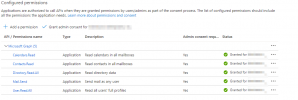
Yes, I have. Here is a screenshot of the configured permissions:
1638802926506.png
 
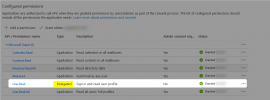
Try adding also the Delegated "User.Read" permission too.
1638803514439.png

This usually exists by default when you create a App Registration.
 
Try adding also the Delegated "User.Read" permission too.
View attachment 26346

This usually exists by default when you create a App Registration.
Neat, that seems to have worked. Not sure why it would of been removed or if I just blindly removed it on accident.

Thank you!
 
  • Like
Reactions: NickD_3CX
You are very welcome! :D
 
Status
Not open for further replies.