Contact Sync

Status
Not open for further replies.

JasonD

Customer
Joined
Jan 20, 2022
Messages
28
Reaction score
1
How do you setup company level contact synchronization with Exchange Online?
 
Yes, but that is for configuring each users "personal" contacts. I want to integrate the company level contacts that are created in M365 and I see on the contacts page an exchange integration for this, but appears for on-premise only, so need to know how to integrate company level contacts from Exhange Online (M365).

Thanks,

Jason
 
Yes, but that is for configuring each users "personal" contacts. I want to integrate the company level contacts that are created in M365 and I see on the contacts page an exchange integration for this, but appears for on-premise only, so need to know how to integrate company level contacts from Exhange Online (M365).

Thanks,

Jason
If you look at point #2 in the link, what you can sync with the 3CX Company Phonebook is Microsoft 365 Shared Mailboxes of well known folders. The guide has a link that explains what the "well known folders" are.
 
So I need to enabled the shared mailbox option and that will sync the company contacts from the "Well Known Folder" contacts, is that correct?
 
So I need to enabled the shared mailbox option and that will sync the company contacts from the "Well Known Folder" contacts, is that correct?
Yes, and if you inspect the screenshot in the guide link I sent, you can also see that there are options where you hand-pick which specific Mailboxes to sync from as well.
 
Ok, so I set this up yesterday, following the steps in the guide. I just checked this AM and not 1 single contact from the companies list of over 250 global contacts in the Contacts "well known" folder have sync'd to 3CX.

Still confused on why this isn't working with Exchange Online.
 
I'm not sure where your contacts currently are but top get this working you need to do the following:
  1. Create a Shared Mailbox
  2. Associate with an existing member who can have access to it.
  3. Log into https://outlook.live.com/ with the credentials you associated with the Shared Mailbox.
  4. In the top right corner of Outlook click on the option "Open another mailbox" and type in the shared mailbox name and press "Open". This should open a new tab.
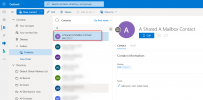
  5. In the new tab, go to People --> Folder --> Contacts and add a new Contact here and add a Mobile Number as well.
    1647351042734.png
  6. In your 3CX Management Console --> Settings --> Microsoft 365, in the Contact Sync tab, enable the Shared Mailbox option, select "Only these users" and press "Add".
  7. Search for the Shared Mailbox name you created in step #1, select it to add to the list and press OK.
  8. Wait 15-20 seconds (depends on how many contacts are in the mailbox)
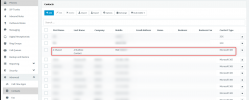
  9. Go to Advanced --> Contacts and you should see the new contact you created in step #5.
    1647351243902.png
 
While I understand this process, why can we sync the global contacts that we have in Exchange Online, there are over 300 that everyone in the company needs access to and having to move them to a Shared Mailbox further complicates sharing them with the company, and results in managing them in 2 places.

We want to share the Global Company Contacts with 3CX.

Jason
 
Hi Jason,

I am just explaining to you the implementation we have done for MS365.

The only other way we have is the "old" way that requires and Impersonated User Account:
https://www.3cx.com/docs/how-to-create-impersonated-user/

While the option still exist in V18 U3, it is not the recommended way anymore, plus this is for Exchange Server 2013/2016.
 
I get that, I guess my question is not being answered directly. Can 3CX sync "external contacts" part of the Exchange Online Global Address Book, rather than having to do a user or shared mailbox?

Jason
 
I get that, I guess my question is not being answered directly. Can 3CX sync "external contacts" part of the Exchange Online Global Address Book, rather than having to do a user or shared mailbox?

Jason
The 2 ways we have implementations for importing and keeping a sync of contacts are the ones outlined above, and only those.
 
  • Like
Reactions: Evolute IT
Status
Not open for further replies.

Forum statistics

Threads
111,832
Messages
589,284
Members
164,662
Latest member
DejanMDS