- Joined
- Feb 1, 2023
- Messages
- 3
- Reaction score
- 1
Hi,
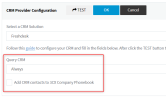
I am writing regarding another system than I specified - the one which allows CRM integration.
So I've bumped into an issue with the contacts when integrating custom CRM (Dentally). When we get inbound calls, the CRM contact link opens correctly as expected.
However, I want the system to also allow opening the CRM calls for outbound calls, which doesn't work if there's a 3CX contact with that phone number in the system. So that really hurts the experience because either:
1) I can keep only CRM contacts. Outbound calls work correctly. However, we'd really need the option to sync/import all options from CRM (even if manually) in order to be able to easily make calls from 3CX. Otherwise, keeping just the CRM contacts when the inbound call is made is clearly not sufficient for existing systems.
2) I can import all contacts from the CRM, which allows easily make calls directly from 3CX, but since the contact is marked as "3CX" type, it does not show an option to open the CRM contact link.
So I am forced to use one or the other, or duplicate the contacts, which also doesn't show an option to open the CRM contact link. Am I missing something here, is there a workaround, or a way to import all CRM contacts as "CRM" contact type? Any help would be much appreciated.
Thanks,
Justinas
I am writing regarding another system than I specified - the one which allows CRM integration.
So I've bumped into an issue with the contacts when integrating custom CRM (Dentally). When we get inbound calls, the CRM contact link opens correctly as expected.
However, I want the system to also allow opening the CRM calls for outbound calls, which doesn't work if there's a 3CX contact with that phone number in the system. So that really hurts the experience because either:
1) I can keep only CRM contacts. Outbound calls work correctly. However, we'd really need the option to sync/import all options from CRM (even if manually) in order to be able to easily make calls from 3CX. Otherwise, keeping just the CRM contacts when the inbound call is made is clearly not sufficient for existing systems.
2) I can import all contacts from the CRM, which allows easily make calls directly from 3CX, but since the contact is marked as "3CX" type, it does not show an option to open the CRM contact link.
So I am forced to use one or the other, or duplicate the contacts, which also doesn't show an option to open the CRM contact link. Am I missing something here, is there a workaround, or a way to import all CRM contacts as "CRM" contact type? Any help would be much appreciated.
Thanks,
Justinas