continuous vibration after call picked up

ZenMasta

Customer
Joined
Mar 10, 2010
Messages
254
Reaction score
10
When a call comes in, my mobile plays the ring tone and vibrates. But when I pick the call up on my desk phone, my mobile vibrates endlessly and the only way to stop is to reboot. I updated the android app as of yesterday but that didn't fix anything.
 
Hello,

Found this also in some cases, it means the data is NOT stable on the network, and information packages are lost.
Are you using this on 4G/5G data on GSM or on the WIFI connection?

If usnig on GSM, can you share the country and provider?
When using WIFI, can you please share the brand of WIFI access point?

Paulo
 
I have wifi and 4g. 4g is stable in my area with no dead zones. My phone is about 2 feet from the Wi-Fi access point.

If that is the case though, it's annoying that there's no way around this besides rebooting the phone. I've even tried force quitting the 3cx app but that didn't do anything.

Wifi access point Asus RT-AC66U
as for data, AT&T USA
 
FWIW the issue you're experiencing isn't limited to the Android app. I've observed it on iOS as well once when my phone had meh connectivity to WiFi in the office. I could decline the call and make it stop ringing, however (no reboot required).

After disconnecting/reconnecting to WiFi the situation resolved.
 
When a call comes in, my mobile plays the ring tone and vibrates. But when I pick the call up on my desk phone, my mobile vibrates endlessly and the only way to stop is to reboot. I updated the android app as of yesterday but that didn't fix anything.
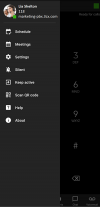
Turn ON the Keep-Active option in Settings, see if there's any improvement (should be)

P.S @precmfg Isn't the same. Due to Apple restrictions, the iOS client is the most "unreliable" in stopping/dropping an incoming call since it involves three channels/ports: 443-push, 5001-myPhone, 5090-SIP. Therefore is guarded internally by a 10-secs max ringing timeout, plus iOS18 (who's using) automatically drop the call after 60 secs anyway.
 
Last edited:
@ZenMasta are you using Keep Active on your device? If so, there is a known issue by Android OS that in specific scenarios, this could happen. We already reported this issue to Google.

If this is the case, as for stopping the vibration, you should simply need to expand the notification panel. This should be enough, no need to reboot the device.
 
  • Like
Reactions: GregG_3CX and K_SAK
I don't know anything about Keep Active. Where is this setting? I don't see it in the app under settings>advanced
Unless you are referring to switch off battery usage optimization.

I might just disable vibration for this app. But today I've turned off data and considering I'm right next to the wifi ap, I shouldn't have any issues. And then tomorrow I'll try data only.
 
@ZenMasta also open the notification panel from the top. Do you see an item 3CX Registered?
If this is the case, then you are using Keep Active mode.
You simply need to go to the hamburger menu and click on Keep active which will prompt you a dialog to turn it off (if it is currently on.)

If this is the case, retest with Keep Active off
 

Members Online Now

No members online now.

Forum statistics

Threads
111,831
Messages
589,277
Members
164,660
Latest member
RJenkinsROCK