Copy number to clipboard during active call - missing!

Peter Tomlins

Bronze Partner
Advanced Certified
Joined
Dec 1, 2020
Messages
33
Reaction score
20
We bit the bullet and finally pushed customers to V20 before the Christmas break—it has been largely pain-free so far, but one customer is bemoaning the fact that their users cannot copy the number from an active (inbound) call in the Windows app, something they regularly used in the V18 Desktop App.

Am I missing a setting somewhere, or has this been removed from the current app?

Thanks!
 
yeah, we're missing that too.
When in a call, a right click on the number for "copy" should be possible
 
Yes, we are also not having that.
Not being able to paste the copied number while on the call.
 
@Peter Tomlins @PBX128 @Sravan0505 Thanks for your feedback.
Could you each give me steps of reproducing this feature?

Unfortunately I don't understand the use case as all three comments seem to be different
 
Good morning,Thom

I'm unsure if the others are talking about 100% the same thing, but here's a breakdown:

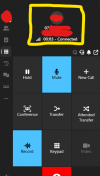
Here's a screenshot of an active "inward" call from an external number - v20 app, ver 20.0.664.0

1735897030433.png

On the previous Desktop app, you could right click the number (highlighted yellow above) and copy this into the clipboard. This feature does not work in V20. This was quite a useful feature and seems odd that it was removed!

Thank you!
 
I don't like to bump posts, but...
@ThomB_3CX - I posted a screenshot that should hopefully clarify the missing copy/paste functionality in the Windows Store app - it would be good to get feedback on whether this feature will be back at some point.

Edit: I've tried the beta app and the functionality is also missing.

Thanks!

​

 
  • Like
Reactions: londonpapakura
I have a similar need to this. On the old windows APP I could highlight text in an SMS message and copy it. Now you can only copy the entire text, which is less useful when you only want to copy a verification code to paste into a web site.

Having the ability to copy data out of the app is very useful.

I also miss having a dedicated window for chat that I could expand full screen on one of my monitors. While I've been living without it, I would love to have that function back in the new app.
 
  • Like
Reactions: Peter Tomlins
I've also been asked for this feature from a few customers who copy the number when receiving a call then look it up in their database.
 
  • Like
Reactions: londonpapakura
We also have some customers asking for this feature.
 
Is it possible that this has not yet found its way into the main release app? Is there a timeframe?

We have the same issue.
 
We successfully added this and will be available for the next release
 
I just checked the feature in the Beta version. @ThomB_3CX, so good to see the feedback was taken seriously and a solution was implemented! Thank you.

Unfortunately, the implementation does not cover our specific need and I can imagine some other users may feel similar. In the previous v18 client, it was possible to select any text and use the regular Windows copy paste function.

This is what we are still missing in the current solution:
> being able to select and copy (via ctrl c) the number or any part of the crm script result (the yellow part below).

Any chance you will allow in this part the regular Win copy paste function? It would be higly appreciated.

Stefan

1756910411171.png
 

Forum statistics

Threads
112,285
Messages
591,704
Members
165,406
Latest member
ARKC