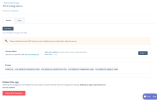
Couldn’t complete the connection

Status
Not open for further replies.

zakaria m

Free User
Joined
Mar 23, 2022
Messages
34
Reaction score
9
Hi, hope everyone is doing well

Every time I try to authorize HubSpot, I keep getting this error

HubSpot error.png
what could be the cause of this error?
 
Thanks for the reply

I only created one developer account, there's only one option to select

should I create a different account?
 
When you Authorize to Hubspot you need to select the global account not the developer account.
 
Thanks, I didn't realize I need another account, although I did wonder where to put all our data like contacts and logs and such
this guide needs to be updated and the fact we need a global account should be added
 
It's my bad then I didn't read it as thorough as I should

thanks again for the help both of you
 
  • Like
Reactions: TheodorosG_3CX
Glad to know your issue is now resolved.;)
 
  • Like
Reactions: zakaria m
Looks like Hubspot has changed the way they authenticat applications. Now only a token is needed, no user ID. Can you please edit the template to reflect this change?
Endpoint also seems to be different.
 
Looks like Hubspot has changed the way they authenticat applications. Now only a token is needed, no user ID. Can you please edit the template to reflect this change?
Endpoint also seems to be different.
Just tested the integration with the existing template, and everything works as expected. No change is required. What issue are you having?
 
HI,
when I create an App in hubspot, I just get one token, not two (Client ID and secret), as 3cx is expecting in template. Furthermore, if I test from CLI, i see thet also the endpoint is different than in template.

I'm attaching a view from HubSpot.
 

Attachments

  • Screenshot 2022-08-30 at 14.26.48.png
    Screenshot 2022-08-30 at 14.26.48.png
    301.5 KB · Views: 9
Status
Not open for further replies.

Forum statistics

Threads
112,147
Messages
590,961
Members
165,167
Latest member
Finatra.us