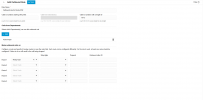
Creating New SIP trunk

Rohit Sachdeva

SMB User
Joined
Oct 30, 2025
Messages
21
Reaction score
0
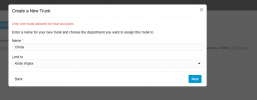
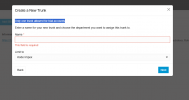
At the time of creating SIP new trunk it ask for Name and after entering any random name it show this default message: Only one trunk allowed for trial accounts and I am unable to proceed further. Please guide me on this same.

Attach is the screenshot for better understanding.
1761813194047.png
 
Hello,

Are you using a Trial install or an SMB?
 
Hello
I had just created an account and it redirect me to admin. I am assuming I am using trial. But there will be 2 users who will be using this so please guide me.

As per my search on google I am SMB user
 
also possible we can connect over call/meet where you can give me more clarity about operating it and how to buy the plan as there is no proper chart or listing about the plan

we are just 2 user so how much time we can use the free trial??
 
The SMB is permanently free, it's not a Trial service. It has some functionality limitations compared to the paid versions, but most small installs should find the features available more than sufficient.

Regarding Trunk, can you advice which trunk provider you chose, and is this the first trunk you are adding? In general for SMB the trunk name needs to truly be unique globally, not just within your instance. So if you just named it as trunk1 or the name of the sip-trunk provider, that's probably taken.
 
  • Like
Reactions: fxbastler
Yes, I am using Twilio as a Trunk provider and yes this is my first trunk
 
Probably a name clash. Try something more specific and keep it to just letters and numbers.
 
  • Like
Reactions: fxbastler
But why this message is coming . Also can you suggest me some name as this is getting critical for me and I need to configure 3cx asap.
1761818156366.png
 
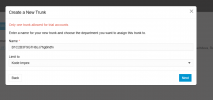
Please check this above screenshot and this one also probable very unique name still same issue

1761818306268.png
 
Hi,

That's actually a message coming through from Twillio - I would guess you already created a trunk when you set-up the trial account with them. Our automated Twillio connector tries to create a new trunk, and this gets rejected by them. Delete the trunk already created on Twillio and it should proceed just fine.
 
Please guide me how I can do that
 
You should be able to login to twilio and do it - or ask their support for details.
 
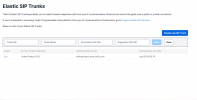
Please check this. I have single SIP trunk under twilio

1761819881036.png
 
Yes, you need to delete that, then the 3CX Twillio setup process will create a new one with all the correct settings for interoperation.
 
Please guide me next step

1761820244766.png
 
Please guide me

1761820548525.png
 
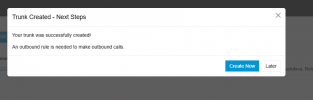
I have setup SIP trunk and add outbound rule with below screenshot still unable to make calls? please suggest

1761821470881.png
 
Hi,

Please read the online guides or look for any errors in the dashboard that might guide you. Also I believe Twilio trial accounts may only be able to call other Twilio numbers.
 
Please share documentation where I can read and configure
 

Members Online Now

Forum statistics

Threads
111,831
Messages
589,277
Members
164,660
Latest member
RJenkinsROCK