CRM Axonaut integration

Status
Not open for further replies.

Clément EQUINOXES

Free User
Joined
Aug 22, 2023
Messages
5
Reaction score
0
Hello, I can't find the solution for authentification API. I understand under BASIC configuration, it doesn't work with my API key.

curl -X 'GET' \
'https://axonaut.com/api/v2/[email protected]' \
-H 'accept: application/json' \
-H 'userApiKey: 11111111111111111111111111'

I think I need to put that somewere

PLease help, thanks in advance

Link to documentation of my API : https://axonaut.com/api/v2/doc
 
I try this but it doesn t work :

<Scenarios> <Scenario Id="LookupByEmail" Type="REST">
<Request Url="https://axonaut.com/api/v2/employees?email=" MessagePasses="0" RequestEncoding="UrlEncoded" RequestType="Get" ResponseType="Json">
<headers>
<accept>application/json</accept>
<userApiKey>[APIkey]</userApiKey>
</headers>
</Request>

Same Error
 
I try this but it doesn t work :

<Scenarios> <Scenario Id="LookupByEmail" Type="REST">
<Request Url="https://axonaut.com/api/v2/employees?email=" MessagePasses="0" RequestEncoding="UrlEncoded" RequestType="Get" ResponseType="Json">
<headers>
<accept>application/json</accept>
<userApiKey>[APIkey]</userApiKey>
</headers>
</Request>

Same Error
This is how you should specify it:
XML:
<Request Url="https://axonaut.com/api/v2/employees?email=" MessagePasses="0" RequestEncoding="UrlEncoded" RequestType="Get" ResponseType="Json">
    <Headers>
        <Value Key="userApiKey">[APIkey]</Value>
    </Headers>
</Request>
 
  • Like
Reactions: Evolute IT
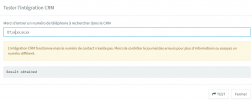
Thanks a lot, it seems to work but, next problem :
1692778513235.png
It say on a first message that the link with the API is working but the number doesn't exist and "check th log".
On a second message, it say "Result obtained"

- I try to call with this number and he doesn't find the contact
- During the test if i put the number without "." between numbers, it give me the same first message but no "Result obtained"
- I re-imported the xml in the CRM tool software before I had error with API and now, no error but nothing appear

I'm close but I don't know what to do

thanks in advance
 
Maybe it will help, the API doc say that :

[
{
"id": 55,
"gender": 1,
"firstname": "Claire",
"lastname": "Rousseau",
"email": "[email protected]",
"phone_number": "0102030405",
"cellphone_number": "0605040302",
"job": "CEO",
"is_billing_contact": true,
"company_id": 33,
"custom_fields": {
"myCustomField": 1
}
}
]

and this the URL to reach API : https://axonaut.com/api/v2/employees?phone=0612345678
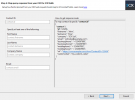
I change "0612345678" by [Number] and I am a bit lost after
1692779514169.png

I try employees.id ??? I don't know, maybe the problem come from that

Thanks in advance
 
My XML files, if it helps
 

Attachments

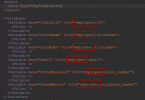
When you map the JSON response to variables, why are you specifying "employees"?
1692791625884.png

The JSON response doesn't have any "employees" node:
JSON:
[
   {
      "id":55,
      "gender":1,
      "firstname":"Claire",
      "lastname":"Rousseau",
      "email":"[email protected]",
      "phone_number":"0102030405",
      "cellphone_number":"0605040302",
      "job":"CEO",
      "is_billing_contact":true,
      "company_id":33,
      "custom_fields":{
         "myCustomField":1
      }
   }
]
 
  • Like
Reactions: Evolute IT
Good morning,
Did you manage to get the coupling with axonaut to work?

I'm trying to do it myself.

Thanks in advance
 
Status
Not open for further replies.

Forum statistics

Threads
111,969
Messages
590,049
Members
164,881
Latest member
mdavis@housingresourcesin